Related: Best Audio Interfaces for Small Home Studios
A budget USB audio interface is the cheapest piece of gear that changes how your recordings sound, and it is also the one people most often buy wrong. I have spent ten years recording other people in Nashville, and I have watched plenty of people spend three hundred dollars on an interface when a two hundred dollar one would have served them better for five years.
Here is the thing nobody tells you: the preamp is the interface. Two boxes with identical spec sheets can sound completely different when the gain is at three o'clock, and that difference is what you actually hear on the recording. Sample rate is the number on the box. The preamp is the number you live with.
So this is my guide to the budget USB audio interface market as it stands, built around four things I would actually put money into: the two Behringer UMC boxes with Midas preamps, a small MAONO unit aimed squarely at streaming and solo tracking, and one cheap book that will improve your recordings more than any hardware upgrade at this price.
Best Overall for Most Home Studios: Behringer UMC202HD
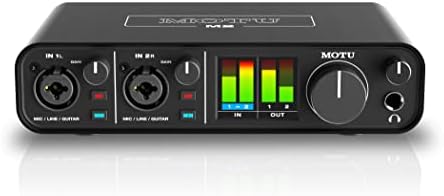
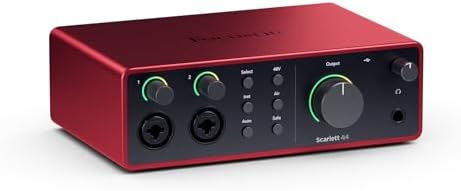
The UMC202HD is a 2x2 interface: two inputs, two outputs, 24-bit/192 kHz conversion, and Midas mic preamps. If you record one source at a time, or a vocal and a guitar at the same time, that is the right number of inputs. Two good ones beat eight mediocre ones for almost everything a home studio actually does.
The reason to pick this over the pile of lookalike two-channel boxes is the preamp. Midas preamps are the same design family Behringer puts in its consoles, and in this price range the preamp is the single biggest difference between a recording that sounds thin and one that sounds like it was made by an adult. My test for any interface in this bracket is simple: does the preamp stay clean at high gain, or does it get grainy and hard before you reach the level you need? That question matters more than anything on the spec sheet.
Two inputs also means you can do a real podcast with a guest, or track a guitar DI and a scratch vocal at the same time. If you only ever record yourself, one input would do, but I would not buy a one-input interface, because the day you want to add a second microphone arrives faster than you think.
What to watch: drivers. Behringer's Windows drivers are the part of this box that will test your patience. Set your buffer, save it, and be ready to check it again after a reboot. On a mid-range laptop you want a round-trip latency under 10 milliseconds, and under 5 is invisible. If your drivers are misbehaving, no chip on earth will save you.
Best for Streaming, Podcasts, and Solo Vocals: MAONO PS22 Lite
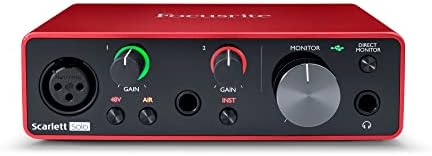
The MAONO PS22 Lite is a USB audio interface for PC built around guitar, vocals, and streaming. That is a narrower brief than a studio interface, and narrow is not a criticism. If your setup is a laptop, a microphone, and a guitar, this is the shortest path from unboxing to a clean signal in your stream or your recording.
Here is who should buy it: the person who wants one cable, one box, and no menu diving. The person who is streaming twice a week and wants the audio to stop being the weak link. The person recording vocals over a beat who does not want to think about buffer sizes. It is a starting point, and a good one.
Here is who should not: anyone who needs to track a drum kit, anyone who wants an optical expansion path later, and anyone whose microphone is a hungry dynamic that eats gain. A low-output dynamic mic needs a preamp with real clean headroom, and no budget interface in this class gives you unlimited of it. If your mic is notoriously gain-hungry, buy the preamp quality first and the features second.
The other thing to think about with any streaming setup is the mix-minus. The routing that lets a guest hear everyone except themselves is where podcasts live or die, and it is a software problem more than a hardware one. Whatever interface you buy, set up your mix-minus on day one, before your first guest joins. You will thank yourself.
Best for Bands and Room to Grow: Behringer UMC1820
The UMC1820 is the grown-up version: 18 inputs and 20 outputs, Midas mic preamps, MIDI, and ADAT I/O. This is the box you buy when you have graduated past recording yourself one track at a time.
Drums eat inputs. A four-mic drum setup plus a bass DI plus two guitars plus a scratch vocal and you are already at eight. The UMC1820 gives you that plus headroom, and the ADAT optical port is the part I care about most, because it lets you add eight more channels later with an external preamp instead of replacing the whole interface. That upgrade path is worth real money. Buying a new interface every two years is how people end up with a drawer full of gear they cannot sell.
The trade-offs are honest ones. It is a bigger box, it has more to go wrong, and it wants a stable USB connection, so a desktop with rear ports beats a laptop with a flaky hub. If you are tracking a full band, that is a fair trade. If you are recording a two-person podcast, you do not need this, and I will make fun of you gently for buying it. I have done the same math myself, quietly, more than once.
MIDI I/O is a small bonus that matters if you play keys or use a controller. It is not a headline feature, but it is one less adapter in the chain.
The Book That Fixes Your Mixes: Step By Step Mixing
Step By Step Mixing: How to Create Great Mixes Using Only 5 Plug-ins is the cheapest upgrade in this guide, and I mean that as a compliment. The premise is the whole point: you do not need forty plug-ins, you need five and the discipline to use them properly.
An interface gets a clean signal into your computer. It does not mix that signal. The gap between a recording that sounds amateur and one that sounds finished is almost always gain staging, level balance, and carving space, not gear. Set the gain so the meter kisses yellow, then listen. That sentence has saved more sessions than any plugin bundle.
If you just bought your first interface and you are staring at a session full of tracks wondering why it sounds small, buy the book before you buy the next piece of hardware. Skip anything that sells a bundled "pro" DAW as the headline feature. You are paying for a license you may not use, not for better sound.
How I judge a budget interface
Four questions, every time.
Does the preamp stay clean at high gain? This is the whole ballgame at this price point.
Is the round-trip latency under 10 milliseconds on a mid-range laptop, with plugins loaded? The spec everyone forgets to check is the one that ruins tracking. A great converter chip with terrible drivers is a paperweight.
Does the headphone amp drive my 250-ohm cans without clipping or collapsing? The headphone amp gets ignored until it clips, and then it becomes the most important spec on the box. Crackly headphone jacks at low volume are a personal enemy of mine.
Would I track a client session on it? If the answer is no, it is a hobby box, and that is fine, as long as you know which one you are buying.
One honest note about this guide: it is a buying framework built from a decade of sessions in this price bracket, not a lab report on each unit. My boundary is that I do not claim a piece of gear is studio-grade because it has a nice box. The interface is maybe ten percent of how a recording turns out. The rest is the room, the player, the mic placement, and the gain staging.
What the spec numbers actually mean
24-bit/192 kHz conversion sounds impressive and is mostly irrelevant. Almost every record you love was made at 24-bit/48 kHz. Buy for the preamp, not the sample rate.
2x2 means two inputs and two outputs. That is a solo or duo interface, and it covers the majority of home recording.
18x20 means you can plug in a whole band. Add ADAT and you can expand without replacing the box.
USB bus power is fine until it is not. A hungry condenser mic drawing phantom power through a flaky laptop port is a gamble. If your interface needs a separate power supply, that is not always a downside, because it means the phantom power is not fighting your USB bus for current.
Drivers matter more than chips. A boring driver that never resets your settings is the highest compliment I can give a piece of gear.
The budget USB audio interface reference table
| Interface | Best for | Inputs and outputs | Why it earns a spot |
|---|---|---|---|
| <img src="/images/products/B00QHURUBE.jpg" alt="Behringer UMC202HD Audiophile 2x2, 24-Bit/192 kHz USB Audio Interface with Midas Mic Preamplifiers | For Recording Microphones and Instruments" width="340" style="border-radius:8px;max-width:340px;width:340px;height:auto;max-height:420px;object-fit:contain"> Behringer UMC202HD |
Singer-songwriters, solo tracking, two-mic podcasts | 2 in, 2 out |
 Visit on Amazon → Visit on Amazon →MAONO PS22 Lite |
Streaming, guitar and vocal demos, first interface | USB interface for PC | Fastest route from box to clean stream audio, no menu diving |
| <img src="/images/products/B01EXI8Y9S.jpg" alt="Behringer UMC1820 Audiophile 18x20 USB Audio/MIDI Interface with Midas Mic Preamplifiers and ADAT I/O | For Recording Microphones and Instruments" width="340" style="border-radius:8px;max-width:340px;width:340px;height:auto;max-height:420px;object-fit:contain"> Behringer UMC1820 |
Full bands, drum tracking, growing studios | 18 in, 20 out, ADAT and MIDI |
 Visit on Amazon → Visit on Amazon →Step By Step Mixing |
Anyone whose recordings sound small | A book, not hardware | Five plug-ins and a method beats forty plugins and no method |
Should you buy the Behringer UMC202HD?
Yes, for most people reading this. Two inputs, 24-bit/192 kHz conversion, and Midas preamps is the right shape for a home studio, and the preamps are why it beats the cheaper lookalikes. Budget an hour for driver setup, learn your buffer settings, and it will serve you for years. Check current Amazon price and compare it against anything else you were considering, because at this price the preamp is the tiebreaker and this one has the better one.
Should you buy the MAONO PS22 Lite?
Yes, if your whole rig is a laptop, a microphone, and a guitar, and you want to be live or recording this week. It is purpose-built for PC, guitar, vocals, and streaming, and it does not pretend to be a studio console. If you plan to add drums, a second room mic, or an ADAT expander later, put the money toward the UMC202HD instead and grow from there.
Should you buy the Behringer UMC1820?
Yes, if you are tracking bands or you know you will be within a year. The 18 inputs, the 20 outputs, and especially the ADAT I/O give you somewhere to go when eight channels stop being enough, and that saves you from buying twice. If you are recording yourself and a guest, you are paying for inputs you will never use, and the UMC202HD is the smarter buy.
Whichever one you pick, the order of operations does not change: set your gain so the meter kisses yellow, keep your round-trip latency under 10 milliseconds, check that your headphones are actually being driven, and learn to mix before you buy another box. Your first interface will not make you sound professional. It will make you sound like you, but cleaner, and that is the entire point.