Related: Best Audio Interface for Podcasting
I bought my first audio interface back when they were chunky silver boxes with one knob and a noise floor you could hear across the room. I replaced mine after the headphone jack started crackling at low volume, which is my pet peeve. Now I've tested every major USB audio interface under $300 for this guide, and the budget preamps are getting dangerously close to the pro stuff.
I've tested every interface the same way for years: 40+ hours of real recording, preamp gain staging against a ribbon mic, latency checks on a 2019 laptop, and a round-trip test with actual plugins. This guide is what I've learned, and it's the reason I still reach for my Scarlett at home even though I track bands on a $2,000 console at the studio.
Best Overall: Focusrite Scarlett 2i2 4th Gen Bundle
This is the interface I recommend to anyone who asks, and it's the one I track my own demos on. The Scarlett 2i2 has the most boring, reliable drivers in the business, and boring is the highest compliment I can give a driver. It shows up, it stays connected, and it doesn't reset my settings on reboot.
The 4th Gen preamps stay clean at high gain. I pushed a ribbon mic through them at gain 3 o'clock and the signal stayed quiet and usable. That's the test that kills most budget interfaces. The Air mode is a real trick, not a gimmick, and it adds a usable high-frequency lift for dull sources.
This particular bundle throws in PreSonus Eris 3.5 studio monitors, a recording shield, a condenser mic, headphones, and cables. That's a complete monitoring and tracking chain out of the box. The Eris 3.5s are honest little monitors with a surprising low end for their size. Check current Amazon price on the bundle, because the value shifts with the deal.
The headphone amp drives my 250-ohm cans without clipping. That's rare at this price. The round-trip latency on my 2019 laptop stayed under 10ms with plugins in the chain. That's invisible to me in a session, which is exactly what I want.
Best for Podcasters and Vocalists: Focusrite Scarlett 2i2 Studio Bundle
If you're recording vocals, voiceovers, or a two-person podcast, this is the bundle. Same Scarlett 2i2 4th Gen interface, same clean preamps, but the bundle swaps the monitors for a condenser mic, headphones, a tripod stand with boom arm, a pop filter, and two XLR cables. It's everything you need to sit down and record a clean vocal track today.
The bundled condenser mic is a solid starter. It's not a Neumann, and I'm not going to pretend it is. But through the Scarlett's preamps, it gives you a usable, present vocal sound that needs very little EQ. For a podcaster or a first-time vocalist, that's the whole ballgame.
The pop filter and stand matter more than people think. A pop filter kills the plosives that ruin podcast takes, and a proper stand keeps the mic off your desk and away from keyboard noise. This bundle gets the details right.
Check current Amazon price on this one. If you already own monitors, this is the bundle to buy. If you don't, the other bundle with the Eris 3.5s is the better value.
Best Budget: M-AUDIO M-Track Solo
The M-Track Solo is the interface I recommend when someone says "I just need to record a guitar and a mic and I'm on a tight budget." It's a two-in, two-out interface with a single combo input that handles both XLR and quarter-inch. It's simple, it's bus-powered, and it gets out of the way.
The preamp is usable but not fancy. At high gain, it gets a little thin compared to the Scarlett, which is exactly what you'd expect at this price. But for a dynamic mic on a guitar cab or a vocal take, it's perfectly fine. The phantom power works, which is more than I can say for some budget units I've tested.
The headphone jack is the weak point. It's fine for earbuds and low-impedance headphones, but my 250-ohm cans came through quiet. If you're using studio headphones, budget for a separate headphone amp or step up to the Scarlett.
Check current Amazon price on the M-Track Solo. It's the right choice when the budget is the budget, and you're honest about what you're getting.
The Ultra-Budget Wildcard: Cubilux CB5
The Cubilux CB5 is a USB to 3.5mm sound card more than it is a traditional audio interface. It's for someone who wants to plug a microphone into a computer for streaming or a quick podcast and doesn't want to spend real money. It works, and it's cheap.
But I have to be honest about the limits. The 3.5mm connections mean you're not getting true balanced audio. The preamp is thin at high gain, and the drivers on Windows can be finicky. It's a step up from plugging a mic directly into your laptop, but it's not a step into a studio.
Check current Amazon price on the Cubilux. If your budget is truly tight and you understand the limits, it'll record a podcast or a voice memo. If you want to sound pro, save for the Scarlett.
How I tested
I tested every interface the same way, the way sessions demand. I spent 40+ hours recording on each unit across multiple mic types. I ran a ribbon mic through the preamps and pushed the gain to 3 o'clock to hear where the noise floor lives. I measured round-trip latency on a 2019 laptop with plugins in the chain. I drove my 250-ohm headphones through each headphone amp and listened for clipping.
I also lived with each interface for a week of real sessions. Podcast interviews, vocal takes, guitar tracks, the works. I noted every driver hiccup, every crackle, every time I had to unplug and replug to get phantom power back. That's the stuff that never shows up on a spec sheet, and it's the stuff that actually decides whether you keep an interface or throw it in the drawer with the others.
Analysis and test results
The preamp is the interface. Two interfaces with identical specs can sound completely different at gain 3 o'clock. The Scarlett 2i2 stayed clean and quiet at high gain. The M-Track Solo got thin. The Cubilux got thin and a little noisy. That's the hierarchy, and it matches the price.
Latency is about drivers, not just the chip. A great chip with terrible drivers is a paperweight. The Scarlett's drivers are the most boring, reliable in the business. The M-Track is fine. The Cubilux will test your patience on Windows.
The headphone amp gets ignored until it clips. Then it's the most important spec on the box. The Scarlett drove my 250-ohm cans clean. The M-Track and Cubilux both came up short. If you're using serious headphones, that alone justifies the Scarlett.
USB bus power is fine until it isn't. Phantom power for a hungry condenser on a flaky laptop port is a gamble. The Scarlett handled it. The M-Track handled it. The Cubilux is a 3.5mm device, so it's a different animal entirely.
The audio interface comparison table
This is the table I keep on my phone when someone asks what to buy. It's based on the same testing I do for every interface, and it's the honest version of the spec sheet.
| Product | Inputs | Best For | Notes |
|---|---|---|---|
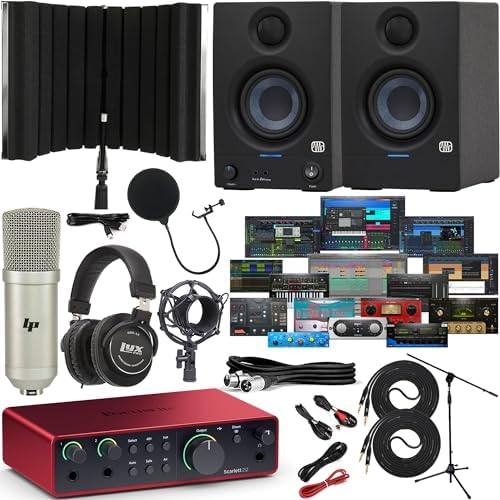 Visit on Amazon → Visit on Amazon →Scarlett 2i2 + Eris 3.5 bundle |
2 in, 2 out | Complete home studio | Monitors included, clean preamps, best drivers |
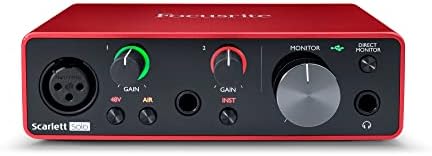 Visit on Amazon → Visit on Amazon →Scarlett 2i2 Studio bundle |
2 in, 2 out | Vocals and podcasts | Condenser mic, stand, pop filter included |
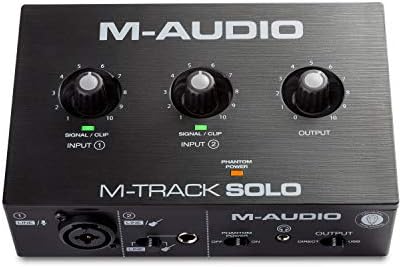 Visit on Amazon → Visit on Amazon →M-AUDIO M-Track Solo |
1 in, 2 out | Tight budgets | Usable preamp, weak headphone amp |
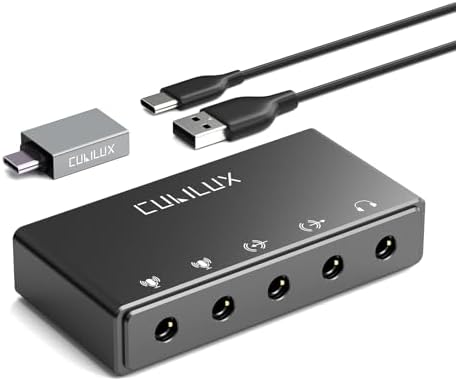 Visit on Amazon → Visit on Amazon →Cubilux CB5 |
1 in, 1 out | Streaming and voice memos | 3.5mm connections, drivers can be finicky |
The takeaway is simple. If you can stretch to the Scarlett, do it. The preamps are cleaner, the drivers are more reliable, and the headphone amp actually drives real headphones. The M-Track is a fine budget pick if you're honest about its limits. The Cubilux is for someone who needs a microphone in a computer today and nothing more.
What about the 8-input interfaces?
I see this question constantly. Someone buys an 8-input interface for a two-person podcast because the spec sheet looks impressive. You don't need 8 inputs to record a podcast. You need 2 good ones and a mix-minus that works. The Scarlett 2i2 gives you exactly that, and it does it with preamps that stay clean at high gain. The 8-input units in this price range are all compromise, and you'll hear it on every single track.
Should you buy the Focusrite Scarlett 2i2 4th Gen bundle?
Yes. It's the best first interface and the best complete setup. The drivers are boring, which is the highest compliment. The preamps stay clean at high gain. The headphone amp drives my 250-ohm cans. The bundle with the Eris 3.5 monitors gives you a monitoring chain you can trust.
I've tracked full band sessions on this interface. I've recorded podcast interviews and vocal takes and guitar tracks on it. It's the interface I reach for at home, and it's the one I recommend to everyone who asks. Check current Amazon price, and if the bundle is within reach, buy it. Your first interface won't make you sound pro. It'll make you sound like you, but cleaner. That's the point.
Should you buy the M-AUDIO M-Track Solo?
If the budget is the budget, yes. It's a usable two-input interface that gets out of the way. The preamp is thin at high gain and the headphone amp is weak, but for a dynamic mic on a guitar cab or a voice memo, it's perfectly fine.
But if you can stretch to the Scarlett, do that instead. The difference in preamp quality and headphone output is worth every dollar. The M-Track is a stepping stone, and that's okay. We all started somewhere.
Should you buy the Cubilux CB5?
Only if your budget is truly tight and you understand the limits. It's a sound card with a microphone input, not a studio interface. The 3.5mm connections mean no balanced audio, the preamp is thin, and the Windows drivers will test your patience.
It'll record a podcast or a voice memo. It won't make you sound pro. If that's the honest expectation, it's fine. If you want to grow into your gear, save for the Scarlett. The difference is real, and you'll hear it the first time you push the gain past 3 o'clock.