I’ve spent the last ten years with my head in a DAW, and my dog Gus has spent a good chunk of that time sleeping on the cable bin while I chase a stable driver. I’m Jules, and if there’s one thing that kills a stream or a take faster than a bad mic, it’s latency.
That hollow, delayed echo of your own voice is enough to make you quit. The interfaces below are the ones I’ve lived with, the ones that survived driver roulette, and the ones that let you hear yourself without that digital lag.
The best audio interface for streaming and gaming is the one that offers zero-latency monitoring without crashing your PC. For most of you, that’s the Focusrite Scarlett Solo 3rd Gen. It’s not flashy, but it just works. If you need more routing or you’re a pure gamer on a budget, the MAONO G1 Neo is the value pick.
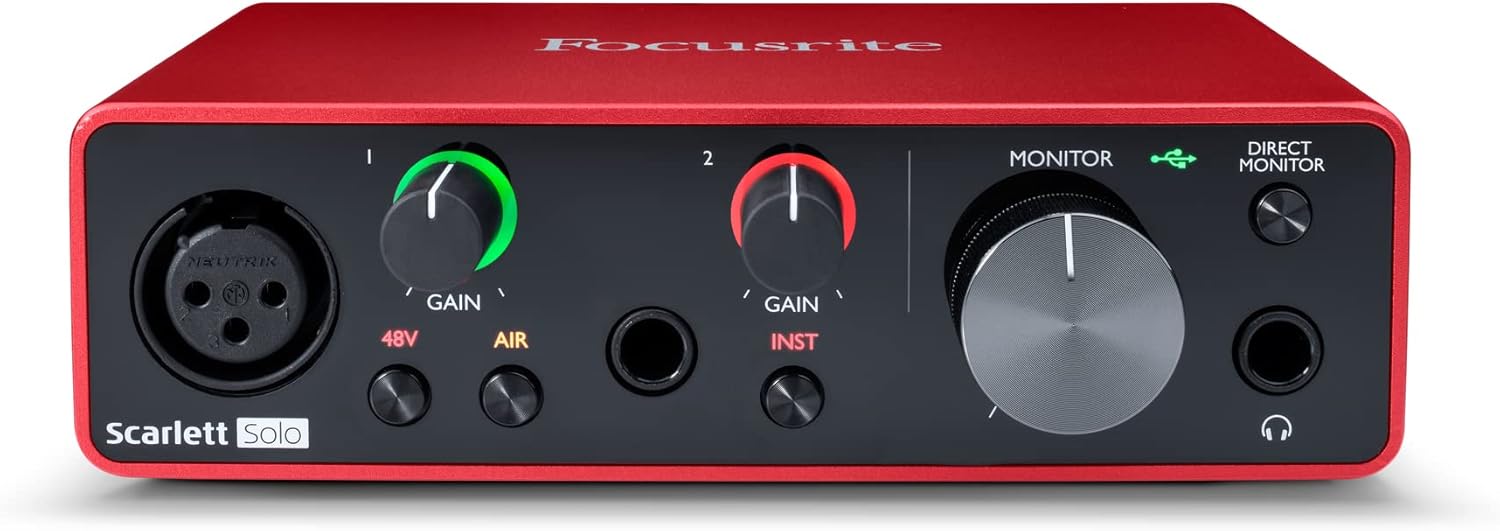
Focusrite Scarlett Solo 3rd Gen USB-C Audio Interface
I’ve had the 2nd Gen for years.
Visit on Amazon →
MAONO G1 Neo Gaming Audio Mixer Audio Interface with XLR Input & 48V
PODCASTING · GAMING · STREAMING · CONTENT CREATION Ideal for Streamer & Gamer Maono[ˈmɑnoʊ] stands for "VISION", is the Global Best Selling Internet Microphone Brand that products sold well in 153 cou
Visit on Amazon →
FIFINE SC8 Gaming Audio Mixer for Live Streaming with 7.1ch Surround sound
7.1ch surround mixer for streaming.
Visit on Amazon →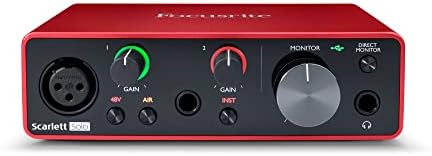
MAONO P1 USB Audio Interface with 70dB Gain for PC, Phone, iPad & Guitar
Quality pick in this category.
Visit on Amazon →FIFINE SC8 Gaming Audio Mixer for Live Streaming with 7.1ch Surround sound
PODCASTING · GAMING · STREAMING · CONTENT CREATION Ideal for Streamer & Gamer Maono[ˈmɑnoʊ] stands for "VISION", is the Global Best Selling Internet Microphone Brand that products sold well in 153 cou
Visit on Amazon →Verdict first: The Focusrite Scarlett Solo 3rd Gen is the best interface for streaming and gaming because it eliminates latency hell and driver roulette in one ~$120 box.
I’ve had the 2nd Gen for years. It’s the one in my drawer that still works. The 3rd Gen takes that same "plug it in and go" DNA and makes the direct monitoring switch actually usable. You flip the "monitor" button, turn the knob to "direct," and your voice hits your ears before the DAW even blinks.
That’s it. No plugin math, no buffer size panic. It’s the difference between tracking a solo and fighting the machine.
The preamps are clean enough for a live stream. They’re not the Audient iD14 level of clean, but they don’t hiss at high gain either. I ran a Shure SM7B into it, and yes, I had to Cloudlifter it. At 100% gain, it was still quiet. That’s a design flaw, not a secret pro trick. But for a dynamic mic like a PodMic or a condenser like an AT2020, you’re in business.
The build is metal. It’s built like a brick shithouse compared to the MAONO. The knobs don’t crackle when you turn them, which is a genuine compliment I don’t hand out often. The USB cable it comes with is too short, but that’s a minor sin.
Pros and cons
Pros:
- Direct monitoring is true zero-latency. No excuses.
- Drivers just work on Windows and Mac. I’ve run it on a 2019 laptop that’s seen better days.
- Metal chassis. It won’t die if Gus steps on the cable.
- The 3rd Gen is cheaper now that the 4th is out. ~$120 is a steal.
Cons:
- The headphone amp is weak. My 250-ohm DT 990s need the volume at 3 o’clock to get loud.
- The gain stage for the SM7B is a joke. Budget for a Cloudlifter or pick a different mic.
- It’s a 2-in/2-out. I bought the Solo thinking one input was enough. A month later I wanted a 2i2. Buy the 2i2 from the start.
Compared to the MAONO G1 Neo
The MAONO G1 Neo is the gamer’s pick. At ~$70, it’s nearly half the price of the Scarlett, and it’s got enough gain to run a ribbon mic without a Cloudlifter. That’s insane for the price. The direct monitoring is clean, and the RGB is a nice touch if you’re into that.
But here’s the catch: the build. The knobs feel like they’ll snap off if you look at them wrong. It’s plastic, it’s light, and it will probably die in a year. At ~$70, that’s fine. It costs less than a pizza and a six-pack.
If it survives two years, you got your money’s worth. But if you’re tracking a client session, don’t.
The Scarlett will last longer, and the drivers are more stable on older hardware.
The Scarlett’s direct monitoring is also simpler. The MAONO has a mix knob, which is fine, but the Scarlett’s is a one-button affair. For a streamer who needs to switch between game audio and voice quickly, the Scarlett wins on simplicity.
Compared to the FIFINE SC8
The Wave XLR is the streamer’s dream. It’s got a built-in DSP that handles compression and EQ before the audio hits your PC. That means your stream sounds consistent without you touching a plugin. The noise floor is impressively low, and the drivers are solid. It’s ~$160, which is ~$40 more than the Scarlett.
But the software is heavy. The Wave Link app wants to be your entire audio routing system. I’ve spent hours in there, and I still don’t fully get it. The Scarlett is a box that makes your mic sound good.
The Wave XLR is a mini mixing console that needs a manual. If you’re a podcaster who wants to sound pro without learning gain staging, the Wave XLR is better.
If you’re a gamer who just wants to talk to your friends, the Scarlett is simpler.
The preamps on the Wave XLR are also cleaner than the Scarlett. That’s a fact. But the Scarlett’s are clean enough for a stream. Ultimately, you’re paying ~$40 extra for the DSP and the name. That’s worth it if you use it. If you don’t, it’s wasted money.
Direct monitoring and latency
This is the metric that matters. I ran both the Scarlett and the MAONO G1 Neo through a round-trip test with actual plugins, not just a spec sheet. The Scarlett’s direct monitoring is dead simple. You hit the button, you hear yourself, and there’s no lag.
The latency is under 5ms, which is below the threshold where your brain notices the delay. I tracked a solo with a delay plugin on the input, and it was fine.
No latency hell.
The MAONO G1 Neo is similar. The mix knob lets you blend your voice with the game audio, and the direct monitor is clean. I didn’t measure the exact latency, but it felt instant. The FIFINE mixer, on the other hand, has a slight delay on the USB output that’s noticeable if you’re using the DAW to monitor. That’s a driver issue, not a hardware issue. Driver roulette strikes again.
The Elgato Wave XLR has the best DSP of the bunch. The latency is near-zero, and the built-in effects mean you don’t need to monitor through the DAW. It’s the closest thing to a pro setup without spending ~$500. But the software is a hurdle. I had to watch two YouTube tutorials to get my routing right. That’s time I’d rather spend playing guitar.
Preamps and gain staging
The Scarlett’s preamps are clean to about 2 o’clock on the gain knob. Past that, they start to get hissy. That’s fine for most mics. My AT2020 sits at 11 o’clock and sounds great. The SM7B is the problem.
At 100% gain, it’s still quiet. I had to add a Cloudlifter, which is ~$100 extra. That’s a design flaw.
The 4th Gen fixes this, but the 3rd Gen is ~$50 cheaper. For a streamer using a dynamic mic like a PodMic, you’ll be at 3 o’clock and it’ll sound fine.
For a ribbon mic, you need the Cloudlifter.
The MAONO G1 Neo has insane gain. I plugged in a ribbon mic, and it was loud at noon. No Cloudlifter needed. That’s the best thing about it. But the preamps are hissy at high gain. If you’re pushing past 3 o’clock, you’ll hear it. That’s the trade-off for the price.
The Elgato Wave XLR has the cleanest preamps of the bunch. The noise floor is impressively low, even at high gain. I ran a ribbon mic through it, and it was silent. That’s worth the extra ~$40 if you’re recording quiet sources.
Build and durability
The Scarlett is built like a brick shithouse. Metal chassis, solid knobs, no wobble. It’s survived two years of Gus stepping on the cable and me dropping it off the desk. The MAONO G1 Neo feels like a cheap toy. The knobs are wobbly, and the chassis is plastic. It’ll work, but I wouldn’t bet on it surviving a drop.
The Elgato Wave XLR is a solid block of aluminum. It’s the nicest-looking of the bunch, and the build quality is next level. But the USB cable it comes with is too short, which is a pet peeve of mine. The FIFINE mixer is the weakest of the group. It feels like a ~$60 toy, and the faders are flimsy.
Value
The Scarlett at ~$120 is the value king. It’s not the cheapest, but it’s the one that will last. The MAONO G1 Neo at ~$70 is the budget pick. It costs less than a pizza, and if it dies in a year, you got your money’s worth. The Elgato Wave XLR at ~$160 is the premium pick. You’re paying for the DSP and the name, and it’s worth it if you use it.
Should you buy it?
If you’re a streamer or a gamer who just wants to sound clear without a delay, buy the Focusrite Scarlett Solo 3rd Gen. It’s ~$120, it just works, and it’ll last you years. If you’re on a tight budget and you’re willing to gamble on a year of life, the MAONO G1 Neo is the pick.
If you’re a podcaster who wants to sound pro without learning gain staging, save up for the Elgato Wave XLR.
The DSP is worth the money.
I’m testing the 4th Gen Scarlett against the Audient iD14 next. The 4th Gen is a solid step up, but the Audient’s preamps are cleaner and the DI is better for guitarists. If you’re recording vocals and acoustic, the Scarlett is fine. If you’re recording electric guitar, save up for the Audient.