Buying your first USB audio interface is the point where a home studio either starts moving or stalls out for six months. The problem is not a shortage of options. It is that every product page sounds identical: clean preamps, low latency, studio quality, and none of it tells you whether the box in front of you will handle a condenser microphone, an electric guitar, and a two-person interview without forcing a second purchase in three months. If you are looking for the best USB audio interface for a small home setup, the deciding factor is almost never the headline spec. It is whether the inputs, the connections, and the included accessories line up with the sessions you actually record.
This guide covers six options that span that range: a two-input starter interface with cables included, a single-box bundle that adds a microphone and headphones, a compact MIDI-capable unit, a voice-focused model, a multi-channel mixer-style console, and a planning guide for people who want to understand the whole chain before spending anything. The scope is deliberately narrow. We are comparing what each product listing states about the hardware and what arrives in the box, not guessing at how any of it sounds.
Related: How to set up your first home recording studio
Quick answer
The Focusrite Scarlett 2i2 4th Gen 2x2 USB Audio Interface Bundle with 2 H&A 6' XLR Cables is the strongest fit for a first serious home studio because it is a two-input, two-output USB interface that arrives with a matched pair of 6-foot XLR cables, which covers the most common starting point: one microphone and one instrument, or two microphones for an interview. Choose the PreSonus AudioBox 96 25th Anniversary USB Audio MIDI Interface Recording Bundle instead when you would rather buy the whole chain in one order, since it adds a cardioid condenser microphone, shockmount, pop filter, XLR cable, mic stand, headphones, and the Studio One Artist DAW to the interface itself.
Audio interfaces and studio gear worth comparing
Focusrite Scarlett 2i2 4th Gen 2x2 USB Audio Interface Bundle with 2 H&A 6' XLR Cables
A two-input, two-output USB audio interface packaged with two 6-foot XLR cables, so a microphone plus an instrument, or two microphones, is covered the day it arrives. The 2i2 format matches what most solo artists and two-person recordings actually need.
Visit on Amazon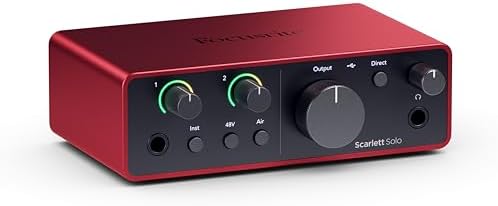
PreSonus AudioBox 96 25th Anniversary USB Audio MIDI Interface Recording Bundle with Studio One Artist DAW Cardioid Condenser Microphone Shockmount Pop Filter XLR Cable Mic Stand and Headphones
A complete starter chain rather than a bare interface: the USB audio and MIDI interface plus a cardioid condenser microphone, shockmount, pop filter, XLR cable, mic stand, headphones, and Studio One Artist. It is the shortest path from nothing to a working recording setup.
Visit on Amazon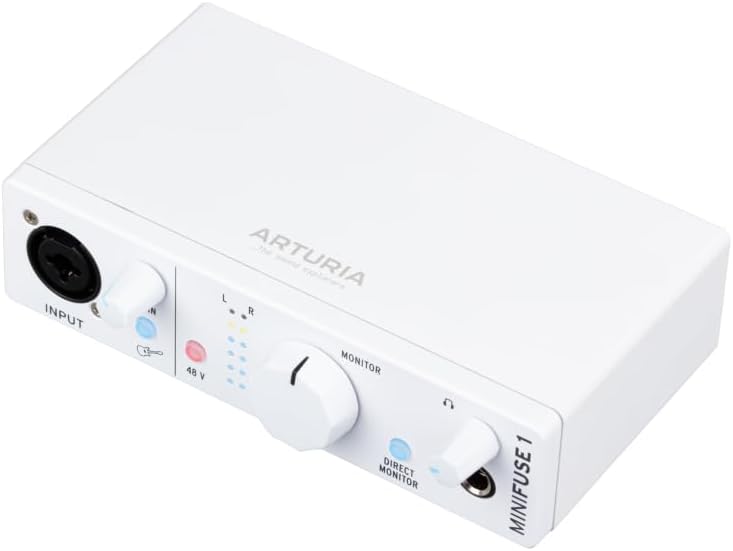
Arturia MiniFuse USB Audio & MIDI Interface, MiniFuse 1
A compact USB audio and MIDI interface from Arturia's MiniFuse line. The MIDI connection is the differentiator here, since it lets a keyboard controller or hardware synth talk to your computer through the same box that handles your audio.
Visit on Amazon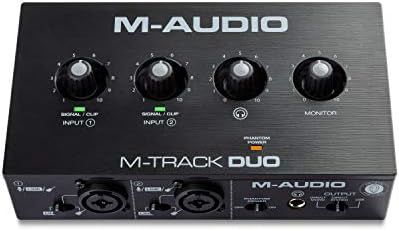
Focusrite Vocaster One
A Focusrite interface from the Vocaster family, which is aimed at voice-first recording and streaming rather than instrument tracking. Worth a look if your sessions are mostly spoken word and you want a simple front panel instead of a rack of routing choices.
Visit on Amazon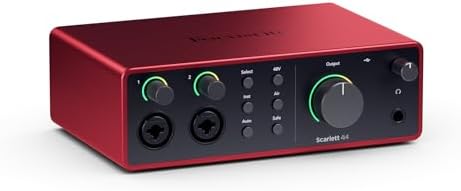
6 Channel Audio Interface Sound Board Mixing Console 16-Bit DSP DJ Mixer Audio Reverb Effect +48V Phantom Bluetooth Studio Audio Mixer For Karaoke Studio Streaming Recording
A six-channel mixer-style unit with 16-bit DSP, onboard reverb, +48V phantom power, and Bluetooth input, positioned for karaoke, streaming, and small live or recording setups. It trades the simplicity of a two-input interface for channel count and built-in effects.
Visit on Amazon
HOW TO SETUP A HOME RECORDING STUDIO "Gear Buying Guide"
A gear buying guide in book form rather than a piece of hardware. Useful as planning material before you order anything, because it walks through the decisions behind a home recording setup instead of just listing boxes.
Visit on AmazonPrices and availability may change. Check the retailer for current details.
How these products were compared
This guide compares input and output counts, connection types including USB, MIDI, and Bluetooth where the listing states them, the accessories and software included with each bundle, onboard features such as phantom power and effects, and how closely the channel count matches a realistic small-studio session. Product names, images, and retailer links are matched by ASIN so that every card points to the product shown.
Nothing here is presented as a lab measurement or a long-term ownership report. The distinctions come from what each product listing states about the hardware, what is confirmed to be in the box, and whether those features line up with how a home studio actually gets used. Prices move constantly and bundles change, so confirm the current price and availability through the retailer link rather than trusting a number printed in an article.
How to choose the right audio interface
Start by counting inputs, not features. Write down everything you will plug in at the same time on your busiest session, not your average one. A solo singer-songwriter who tracks one part at a time needs a single good input. Someone recording a two-person interview needs two. A guitarist who wants to sing and play simultaneously needs two. Anything beyond that, a drum kit, a full band, a panel of guests, pushes you toward the multi-channel end of this list, and that is a real decision rather than an upsell. The six-channel mixer-style console exists for people who genuinely need to have several sources live at once. If that is not you, extra channels are just more knobs to set wrong.
Next, look at what arrives in the box and what has to connect. A bare interface assumes you already own a microphone, a stand, cables, and headphones. A bundle assumes you own none of it. The PreSonus package here is the clearest example of the second approach, since the microphone, shockmount, pop filter, XLR cable, mic stand, and headphones are all part of the purchase along with the Studio One Artist DAW. That is convenient, but it also means you are accepting someone else's choices for every part of the chain. If you already have a microphone you like, buying a bare interface and your own cable is the cleaner path.
Third, check the connections you will actually use. MIDI matters if a keyboard controller or hardware synth is part of your setup, and the Arturia MiniFuse line includes it. Bluetooth input on the mixer-style unit is handy for playing reference tracks from a phone without repatching anything. USB bus power keeps the desk simple, but if you plan to run a condenser microphone that needs phantom power, confirm the interface supplies it before ordering. If you are still working out how the pieces fit together, our home recording studio setup guide walks through the chain from microphone to monitor.
Focusrite Scarlett 2i2 4th Gen 2x2 USB Audio Interface Bundle with 2 H&A 6' XLR Cables
This is the pick because the format matches the job. It is a two-input, two-output USB audio interface, and the bundle adds two 6-foot XLR cables so the first session does not stall on a missing cable order. Two inputs is the number that covers the majority of home recording: one microphone and one guitar, two microphones for a conversation, or a stereo pair for an acoustic instrument. The 2i2 layout is also the one most tutorials and routing guides assume you are using, which matters more than people admit when you are learning.
The trade-off is scope, and it is worth being blunt about it. Two inputs is two inputs. If your sessions regularly involve a third microphone, a stereo keyboard pair, or a host plus a guest plus a phone line, you will run out of inputs, and the bundled cables only help as far as two sources. This package does not pretend to be an eight-channel rig, and it should not be bought as one.
Alternatives to consider
The PreSonus AudioBox 96 25th Anniversary USB Audio MIDI Interface Recording Bundle with Studio One Artist DAW Cardioid Condenser Microphone Shockmount Pop Filter XLR Cable Mic Stand and Headphones is better suited to someone starting from zero who wants one order to cover the interface, the microphone, the stand, the headphones, and a DAW, while the Arturia MiniFuse USB & MIDI Interface, MiniFuse 1 is a stronger fit when desk space is tight and you want MIDI connectivity in the same box as your audio input.
The Focusrite Vocaster One, the 6 Channel Audio Interface Sound Board Mixing Console 16-Bit DSP DJ Mixer Audio Reverb Effect +48V Phantom Bluetooth Studio Audio Mixer For Karaoke Studio Streaming Recording, and the HOW TO SETUP A HOME RECORDING STUDIO "Gear Buying Guide" cover the remaining ground. The Vocaster One is the voice-first option for spoken-word and streaming work. The six-channel console is for setups that need several live sources plus onboard reverb and Bluetooth playback. The buying guide is for the reader who wants to understand the whole signal chain before committing to any hardware at all.
Day-to-day use and maintenance
Most interface problems at home are cable and power problems wearing a costume. Use balanced XLR cables for microphones rather than adapting a cable you found in a drawer, keep an eye on which USB port you are using, and avoid moving a bus-powered interface between ports mid-session, since that is how settings and device recognition get scrambled. If a condenser microphone is in your chain, phantom power has to be supplied by the interface and switched on deliberately, and it should be off before you connect or disconnect that microphone.
Gain staging is the habit that separates a clean recording from a distorted one, and it costs nothing. Set the input gain so your loudest moment sits comfortably below clipping, then leave it alone for the rest of the take. Do not ride the knob between verses. On the maintenance side, keep the interface somewhere it will not collect dust, keep drinks off the same surface, and store cables coiled rather than kinked at the connector, which is where most of them eventually fail. If your setup includes a microphone stand and a shockmount, check the hardware is tight before each session rather than after the first take.
Buying checklist
- Count the inputs you need on your busiest session, not your average one.
- Choose your connection type, USB, MIDI, or Bluetooth, based on normal use rather than an occasional edge case.
- Confirm that the exact model supplies phantom power if you plan to use a condenser microphone.
- Check what is included: cables, microphone, stand, headphones, and DAW licenses all change the real cost of the purchase.
- Read the setup and maintenance instructions, and verify the current retailer price, availability, and return terms before ordering.
Final recommendation
Choose the Focusrite Scarlett 2i2 4th Gen 2x2 USB Audio Interface Bundle with 2 H&A 6' XLR Cables when you are recording one or two sources at a time and want an interface that arrives ready to plug a microphone and an instrument into. Choose the PreSonus AudioBox 96 25th Anniversary USB Audio MIDI Interface Recording Bundle when you would rather have the entire chain, microphone through headphones, arrive in one order. If neither fits, look at the Vocaster One for voice work, the six-channel console for multi-source setups, or the MiniFuse line if MIDI is part of your workflow.
The honest summary is that any of these will record audio. What separates them is whether the input count, the connections, and the contents of the box match the sessions you will actually run, and that is a question only you can answer before you buy.