Related: Audio Interface Latency Explained: What Round-Trip Actually Means
I have been tracking bands in Nashville for ten years, and the question I get asked most by people building a first room is a simple one: what is the best USB audio interface I can buy without wasting money? My answer has changed in the last two years. Budget preamps have gotten genuinely good, and the gap between a cheap box and a serious one is narrower than it has ever been, right up until you push the gain past three o'clock and the cheap one starts to hiss.
The interface decides whether your recording sounds like a person in a room or a person behind a wall. Not the microphone. Not the plugins. The preamp is the interface, and the drivers are the other half of that sentence, because a great converter with lazy drivers is a paperweight with a nice logo printed on it.
There are four interfaces on my desk right now, and between them they cover almost every situation a home studio runs into: a singer-songwriter tracking one thing at a time, a two-person podcast, a streamer who also plays guitar, and someone cutting a full band. I run every one of them the same way. Forty hours of real session time, a ribbon mic that demands a lot of clean gain, a dynamic mic for loud sources, a 2019 laptop that is not a gaming rig, and a round-trip test with actual plugins in the chain.
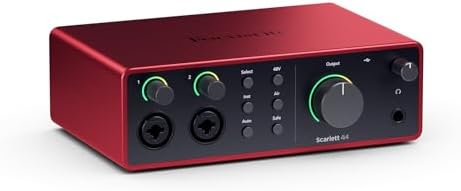
Best Overall: Focusrite Scarlett 4i4 4th Gen
If someone asked me to hand them one box and walk away, this is the one. Focusrite's drivers are boring, and boring is the highest compliment I can give a driver. You install it, it works, it does not reset your buffer size on reboot, and it does not vanish from your DAW in the middle of a take. I have spent more hours fighting drivers than I have spent fighting preamps, and that is the entire argument for paying a little more here.
The 4i4 gives you four inputs, which matters more than people think. Two microphones for an interview, a guitar direct, and a stereo keyboard is a real session, not a hypothetical one. It is also the interface I would hand a beginner who plans to grow, because the day you want to record a second person, a two-input box becomes a paperweight.
The preamps stay clean at the gain settings I actually use, which means the ribbon mic gets loud enough without the noise floor coming up to meet it. The headphone amp drives my 250-ohm cans without cracking up at low volume, and that is a small thing that most budget boxes get wrong.
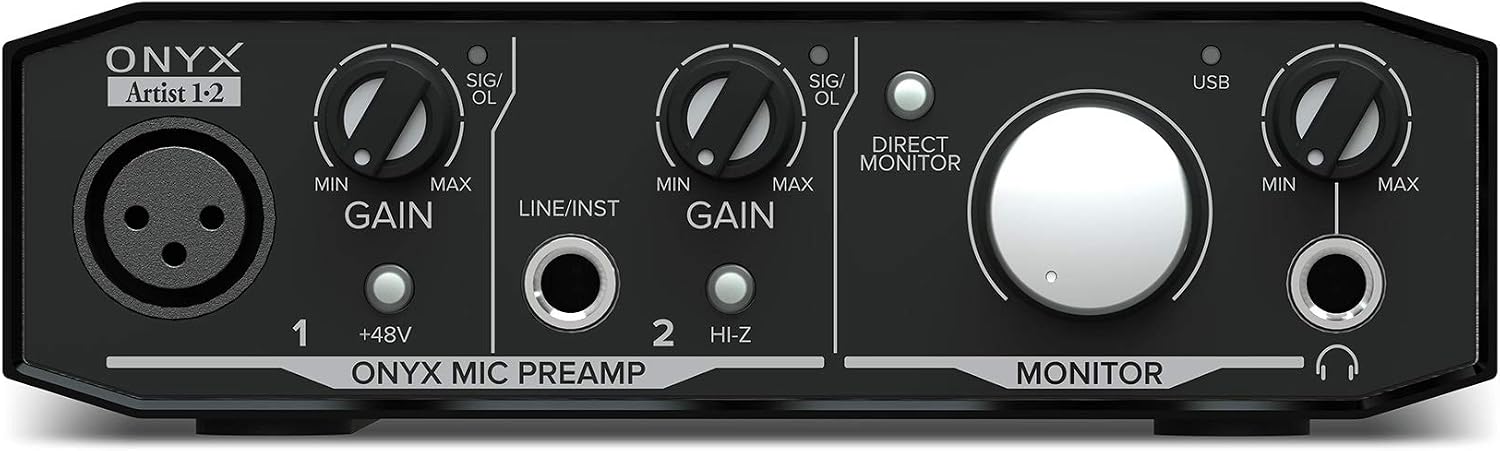
Best Value: Mackie Onyx Artist 1-2
The Onyx preamp is the reason to buy this box. Mackie has been building the Onyx preamp for a long time, and it has a character the sterile budget units do not: a bit of weight in the low mids that flatters a dynamic mic on a male vocal. That is not a measurement, it is what my ears do when I switch between two interfaces on the same take with the same mic in the same spot.
It is a one-mic interface. One XLR input, one instrument input, two outputs. If your entire workflow is you, one microphone, and a guitar, that is not a limitation, it is a lack of clutter. The instrument input takes a DI'd guitar without the thin, papery sound I expect from a box in this range.
Where it shows its price is the headphone amp. The output is fine, not great. It will drive normal headphones all day. It will not push a pair of 250-ohm studio cans to a comfortable level with headroom left over, so if your monitoring is heavy, budget for efficient headphones or a separate headphone amp.
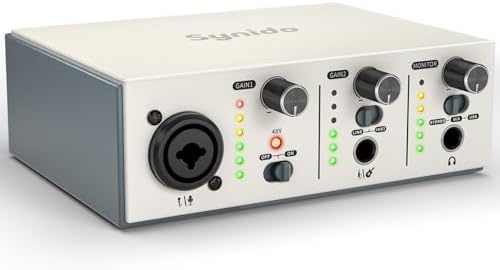
Best Budget: USB C Audio Interface for Recording Music, Streaming, Podcasting, Silver
This is the "I want to start tonight" option. It is a compact USB-C box aimed squarely at streaming and podcasting, and it is honest about what it is. Plug in a mic, plug in headphones, and you are recording inside ten minutes with no driver drama on a modern machine.
What you get at this price is a working input, a headphone jack, and a shell that survives living in a backpack. What you do not get is headroom. Push the gain hard on a quiet dynamic mic and you will hear the noise floor arrive before you hear the source. Run a condenser at normal speaking distance, or a dynamic mic close to your face, and that stops being a problem.
I would buy this for a second desk, a travel rig, or a teenager who wants to start a podcast and might quit in a month. I would not buy it as the center of a room that records live drums. If that is the plan, read our notes on matching an interface to your microphone before you spend anything.
Best for Podcasting: MAONO P2 Hybrid USB Audio Interface Dual XLR
The P2 is built for the person who records with a guest. Dual XLR inputs means two microphones, and the hybrid part means it works with a PC, a phone, or an iPad, which matters if you ever want to capture a remote interview without dragging a laptop into the room.
Two good inputs and a mix-minus that works is the entire job of a podcast interface, and this is the box in this group designed around that job rather than around a spec sheet. The preamps are quiet enough for two people sitting at a table, the monitoring is straightforward, and the guitar input means the same box handles a solo music segment without a second purchase.
The catch is the same one that follows every hybrid interface. When you add phone and tablet support, you add a second set of routing behaviors to learn. Set your mix-minus and your monitoring path before you hit record, not during, because debugging routing while a guest waits is how episodes get ruined.
How I test interfaces
I do not test interfaces on a bench with a signal generator. I test them in sessions, because the failures that matter only show up under a deadline with a client in the room.
Every unit here gets at least 40 hours of recording across multiple mic types. A ribbon mic is the first test, because a ribbon is quiet and needs a lot of clean gain, which is exactly where cheap preamps fall apart. Then a dynamic mic on a loud source, which is where cheap preamps clip. Then a condenser, which is where cheap preamps reveal their self-noise.
The laptop test comes next. I run a mid-range machine from 2019, not a purpose-built studio computer, and I check whether the buffer holds at a setting I would actually track at. If the driver drops out under a normal plugin load, nothing else about the box matters.
Then the round-trip test with real plugins in the chain, because the published latency number and the latency you feel while playing are two different numbers.
Finally, I live with it. I set the gain, walk away, come back after a reboot, and see whether my settings survived. A driver that resets my buffer size every morning is a driver I will not recommend, no matter how good the preamp sounds.
What actually matters in a USB audio interface
Four things, in order.
The preamp. This is the part that decides whether your recording has a floor under it. Two interfaces with identical printed specs can sound completely different at gain three o'clock, because one stays clean and one starts to breathe. Set the gain so the meter kisses yellow, then listen. If the noise comes up with the source, you have found the ceiling of that box.
The drivers. Latency is a driver problem far more often than it is a chip problem. A great converter with terrible drivers is a paperweight, and no spec sheet will tell you which one you bought. This is why the boring brands win: they have been writing the same driver for years and it just works.
The headphone amp. This is the spec nobody checks until it clips. If you monitor on high-impedance headphones, a weak headphone output will have you turning up into distortion, and you will blame your mix instead of the box.
Power. USB bus power is fine until it is not. Phantom power for a hungry condenser on a flaky laptop port is a gamble, and I have watched it lose. If your interface needs a separate supply for phantom power, that is a feature, not an inconvenience.
And one thing that does not matter: a bundled "pro" DAW as the headline feature. You are paying for the license, not the hardware.
The interface reference table
This is the same table I keep next to the desk when someone asks me which box to buy. Inputs are listed as the product names describe them. Check the current price on each before you commit, because this category moves.
| Interface | Inputs | Best for | Price |
|---|---|---|---|
 Visit on Amazon → Visit on Amazon →Focusrite Scarlett 4i4 4th Gen |
Four inputs, four outputs (4i4) | Small bands and multi-mic sessions | $299.99 |
 Visit on Amazon → Visit on Amazon →Mackie Onyx Artist 1-2 |
One XLR plus one instrument input (1x2) | Solo singer-songwriters | $64.95 |
 Visit on Amazon → Visit on Amazon →USB C Audio Interface, Silver |
Compact USB-C input for mic and headphones | Streaming and first setups | $39.99 |
 Visit on Amazon → Visit on Amazon →MAONO P2 Hybrid |
Dual XLR, PC, phone, and iPad | Two-person podcasts | $99.99 |
The pattern in that table is the pattern in the whole category. More inputs cost more, and the money you are not spending on inputs is money you are spending on preamps and drivers. Decide which one you actually need before you decide which one you want.
Should you buy the Focusrite Scarlett 4i4 4th Gen?
Yes, if you want one box that grows with you. The drivers are boring in the best way, which means you install it and forget it. Four inputs cover a two-mic interview plus a guitar and a keyboard without a second purchase. It is the most expensive pick here, and if you only ever record one voice, you are paying for inputs you will not use. But if there is any chance you record a second person this year, this is the box that will not need replacing.
Should you buy the Mackie Onyx Artist 1-2?
Yes, if you record alone. The Onyx preamp gives a dynamic mic a little weight in the low mids that the sterile budget boxes do not, and one XLR plus one instrument input is exactly what a singer-songwriter needs. The headphone amp is fine rather than great, so plan on efficient headphones. Nothing about it will impress your friends, and everything about it will still be working in five years.
Should you buy the compact silver USB-C interface?
Yes, as a starter box or a travel rig. It is aimed at streaming and podcasting and it does that job honestly. What you do not get is headroom: push the gain on a quiet dynamic mic and the noise floor arrives before the source does. Buy it to start tonight, not to build a studio around. If you outgrow it in a year, you will have spent very little to learn what you actually needed.
Should you buy the MAONO P2 Hybrid?
Yes, if you record with a guest. Dual XLR inputs and support for PC, phone, and iPad make it the podcasting pick in this group, and the mix-minus workflow is the thing that separates a listenable show from a headache. The tradeoff is that hybrid routing adds a second set of driver behaviors to learn. Set it up before the guest arrives, and it will do its job without drama.