Choosing a USB audio interface is mostly a math problem about inputs, and only partly a sound problem. You need enough preamps for the microphones you actually plug in at the same time, a driver that does not fight your computer, and a box that fits the way you already work. Sample rate, bundled software, and chassis material are details you can live with or without.
This guide covers six options that sit in different corners of that math: a two-input starter interface built around Midas mic preamps, a high-gain unit that also works with a phone or an iPad, an 18-input expander with ADAT, two MIDI-equipped 2x2 boxes, and one mixing guide for after the tracking is finished. The focus throughout is USB audio interfaces for home recording, so every interface here connects over USB and runs from the computer rather than from a rack of outboard gear.
Related: Gain Staging Basics for Budget Audio Interfaces
Quick answer
The Behringer UMC202HD Audiophile 2x2, 24-Bit/192 kHz USB Audio Interface with Midas Mic Preamplifiers is the strongest fit for two-channel home recording because it pairs Midas mic preamplifiers with 24-bit/192 kHz conversion in a straightforward 2x2 layout. Choose the Behringer UMC1820 Audiophile 18x20 USB Audio/MIDI Interface instead when you need many simultaneous inputs and ADAT expansion.
Audio interfaces worth comparing
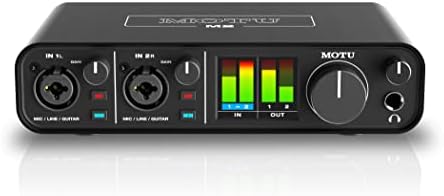
Behringer UMC202HD Audiophile 2x2, 24-Bit/192 kHz USB Audio Interface with Midas Mic Preamplifiers
Check current Amazon price
A 2x2 USB interface with Midas mic preamplifiers and 24-bit/192 kHz conversion, intended for recording microphones and instruments.
Visit on Amazon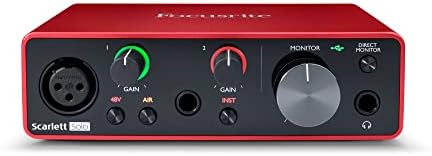
MAONO P1 USB Audio Interface with 70dB Gain for PC, Phone, iPad & Guitar
A USB interface with 70 dB of gain that is designed to work with a PC, a phone, an iPad, and a guitar.
Visit on Amazon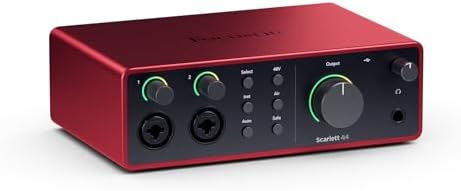
Behringer UMC1820 Audiophile 18x20 USB Audio/MIDI Interface with Midas Mic Preamplifiers and ADAT I/O
An 18x20 USB audio and MIDI interface with Midas mic preamplifiers and ADAT I/O for setups that need many inputs.
Visit on Amazon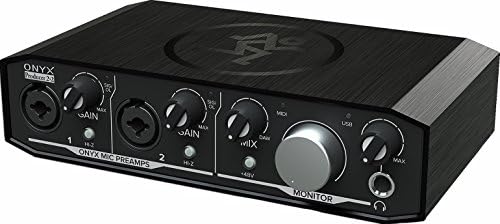
Mackie Audio Interface, Onyx Producer 2X2 USB Audio Interface with MIDI (Onyx Producer 2-2)
A 2x2 USB audio interface with MIDI connectivity and Onyx preamplifiers in a compact desktop format.
Visit on Amazon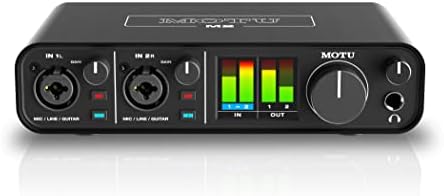
PreSonus Studio 24c 2x2, 192 kHz, USB Audio Interface with Studio One DAW Recording Software
Check current Amazon price
A 2x2 USB interface with 192 kHz support that ships with Studio One recording software.
Visit on Amazon
Step By Step Mixing: How to Create Great Mixes Using Only 5 Plug-ins
A mixing guide built around five plug-ins, useful once your interface is connected and you are ready to mix what you tracked.
Visit on AmazonPrices and availability may change. Check the retailer for current details.
How these products were compared
This guide compares input and output counts, documented preamp and gain specifications, conversion and sample rate support, connectivity and expansion options, and the software or driver support each product lists. Product names, images, and retailer links are matched to their catalog identifiers so that every card points to the product shown, and the same identifiers are used to build each link.
Two of these products are two-channel interfaces, one is a high-gain unit aimed at phone and tablet recording as well as computers, one is an 18-input interface with ADAT, and one is a book about mixing rather than a piece of hardware. That mix is deliberate. The right purchase for a two-person podcast is not the right purchase for a band tracking drums, and a mixing guide is a more useful second purchase than a fourth interface.
How to choose the right audio interface
Start by counting simultaneous inputs, not total inputs. A solo vocalist, a guitarist who overdubs, and a two-person podcast all fit inside a 2x2 design, which is what the Behringer UMC202HD, the Mackie Onyx Producer 2X2, the PreSonus Studio 24c, and the MAONO P1 all provide. Two preamps is enough until you invite a third person to the table, and buying eight inputs for a two-mic show usually means paying for channels that stay empty.
The next question is expansion. If you already own an eight-channel preamp, or you plan to add one, the Behringer UMC1820 is the only interface in this group that documents ADAT I/O, which is the standard way to bring extra channels into a USB interface over a single optical cable. It also documents MIDI, as does the Mackie Onyx Producer 2X2, so if a keyboard controller or a hardware synth is part of your setup, those two deserve a closer look before you settle on a plain 2x2 box.
Then match the details to the rest of your workflow. The MAONO P1 lists 70 dB of gain and compatibility with a PC, a phone, an iPad, and a guitar, which makes it the odd one out here for anyone who records away from a desk. The PreSonus Studio 24c lists 192 kHz support and ships with Studio One recording software, which matters if you do not already own a DAW. The Behringer UMC202HD lists Midas mic preamplifiers and 24-bit/192 kHz conversion. If you are still deciding how much of your budget belongs to the interface and how much belongs to the microphone, our guide to pairing a first microphone with a budget interface walks through that split.
Behringer UMC202HD
The UMC202HD is a 2x2 USB interface with two inputs and two outputs, 24-bit/192 kHz conversion, and Midas mic preamplifiers, and it is positioned for recording microphones and instruments. For a home studio that tracks one or two sources at a time, that combination covers the essentials: a preamp path for a vocal mic, a second channel for a guitar or a second voice, and conversion headroom well above what a typical project needs.
The trade-off is scale. This is a two-channel design with no MIDI I/O and no ADAT expansion documented in its listing, so it will not grow into a drum-tracking setup and it will not accept an external eight-channel preamp later. It also means every session decision lives in your computer, since there is no mixer surface or onboard routing to fall back on. If either of those limits sounds like a problem in six months, the UMC1820 in this group solves both, at the cost of a larger footprint and a more complicated setup.
For most people starting a home studio, the honest framing is this: the interface is a small percentage of how your recordings sound, and the preamp is the part of it you will actually hear. That is the argument for a two-input box with good preamps over a bigger box with mediocre ones.
Alternatives to consider
The Behringer UMC1820 Audiophile 18x20 USB Audio/MIDI Interface with Midas Mic Preamplifiers and ADAT I/O is better suited to multi-source tracking and anyone who needs ADAT expansion, while the MAONO P1 USB Audio Interface with 70dB Gain for PC, Phone, iPad & Guitar is a stronger fit when you record on a phone or tablet and need a lot of clean gain for a demanding microphone.
The Mackie Audio Interface, Onyx Producer 2X2 USB Audio Interface with MIDI (Onyx Producer 2-2), the PreSonus Studio 24c 2x2, 192 kHz, USB Audio Interface with Studio One DAW Recording Software, and Step By Step Mixing: How to Create Great Mixes Using Only 5 Plug-ins cover the remaining cases. The Mackie brings MIDI and Onyx preamps to a 2x2 layout. The PreSonus brings 192 kHz support and a bundled DAW for anyone starting from nothing. The book is the one item here that improves your results without changing a single cable, which is worth saying plainly in a category where people upgrade hardware to fix problems that are really mixing problems.
Day-to-day use and maintenance
Gain staging is the habit that matters most. Set the input gain so your loudest take peaks comfortably below clipping, then leave it alone for the session. If you find yourself riding the knob between takes, the gain was too high to begin with, and a distorted vocal cannot be fixed later. Keep an eye on the meter rather than your ears when you set levels, because a signal that sounds fine in headphones can still be clipping the converter.
Drivers and connections are the second habit. Install the manufacturer's current driver for your operating system rather than relying on whatever the computer picks automatically, and check for updates when you change operating systems. Prefer a direct USB port over an unpowered hub, especially on a laptop, because bus-powered interfaces draw their current from that port. Unplug the interface using the safe-eject or shutdown routine rather than yanking the cable mid-session, and treat the headphone jack gently, since a cracked jack is the most common way a working interface becomes a drawer ornament.
Care is simple. Keep drinks away from the top panel, dust the inputs occasionally, and coil cables loosely instead of wrapping them around your hand. Store the interface somewhere dry when it is not in use, and avoid leaving it on a windowsill or in a car, where heat and cold cycling do the most damage to solder joints and capacitors.
Buying checklist
- Count the inputs you will use at the same time, then add one for a guest.
- Confirm the exact model documents the phantom power your condenser microphone needs.
- Decide whether MIDI or ADAT expansion is a real requirement or a someday-maybe.
- Check that the interface connects the way your computer does, whether that is USB-A, USB-C, or a phone or tablet.
- Confirm whether a bundled DAW is something you will actually use, or a license you are paying for anyway.
- Verify the current retailer price, availability, and return terms before you commit.
Final recommendation
Choose the Behringer UMC202HD Audiophile 2x2, 24-Bit/192 kHz USB Audio Interface with Midas Mic Preamplifiers when you record one or two sources at a time and want Midas preamps with 24-bit/192 kHz conversion in a simple 2x2 layout. Choose the Behringer UMC1820 Audiophile 18x20 USB Audio/MIDI Interface when you need many simultaneous inputs, MIDI, and ADAT expansion, and look at the MAONO P1 when phone and tablet recording is part of the plan.
If none of those distinctions match how you work, the sensible move is to pick on price and port layout rather than features. The documented differences between the 2x2 options here are real but narrow, and the money you save on a second input you never use is better spent on a microphone stand, a decent cable, or a book about mixing.