Choosing a USB audio interface for recording usually starts with one plain question: how many things do I need to plug in at the same time? That answer decides more than any spec sheet does, because an interface with the wrong input count becomes a daily annoyance, while the right one disappears into the session and lets you work.
This guide covers six options that span the realistic range for a home setup: a compact two-channel starter box, two Midas-equipped Behringer units, a Mackie with MIDI, an Audient built around a Class A console preamp, and a mixing book for the part that happens after tracking. The emphasis is on what verified product data actually tells you, which is mostly preamp type, input and output count, connectivity, expansion options, and headphone provision.
Related: How to Set Gain Staging on a Budget Interface
Quick answer
The Audient iD4 MKII is the strongest fit for a two-input home studio because it pairs a Class A console microphone preamp with high speed USB-C, monitor mix and monitor panning controls, and two headphone outputs, and it is compatible with Mac, PC, and iOS. Choose the Behringer UMC202HD instead when budget is the deciding factor and Midas mic preamplifiers with 24-bit/192 kHz conversion cover what you record.
USB audio interfaces worth comparing
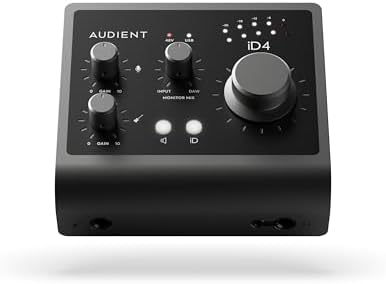
Audient Audio Interface iD4 MKII, Class A Console Microphone Preamp (High Speed USB-C, Monitor Mix and Monitor Panning Function, 2 Headphone Outputs, Mac/PC/iOS Compatible), Black
A two-input interface built around an Audient Class A console microphone preamp, with high speed USB-C, monitor mix and monitor panning controls, two headphone outputs, and Mac, PC, and iOS compatibility.
Visit on Amazon
Behringer UMC202HD Audiophile 2x2, 24-Bit/192 kHz USB Audio Interface with Midas Mic Preamplifiers | For Recording Microphones and Instruments
A 2x2 USB interface with Midas mic preamplifiers, 24-bit/192 kHz conversion, and a straightforward layout for recording microphones and instruments.
Visit on Amazon
Behringer UMC1820 Audiophile 18x20 USB Audio/MIDI Interface with Midas Mic Preamplifiers and ADAT I/O | For Recording Microphones and Instruments
An 18x20 USB audio and MIDI interface with Midas mic preamplifiers and ADAT I/O, aimed at setups that need to track a larger number of channels at once.
Visit on Amazon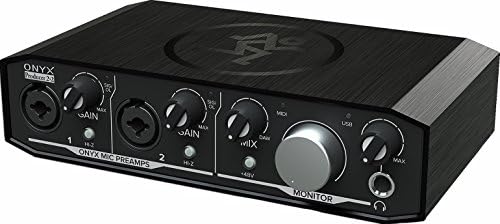
Mackie Audio Interface, Onyx Producer 2X2 USB Audio Interface with MIDI (Onyx Producer 2-2)
A 2x2 USB audio interface with MIDI input and output, which matters when a keyboard, controller, or sound module is part of the rig.
Visit on Amazon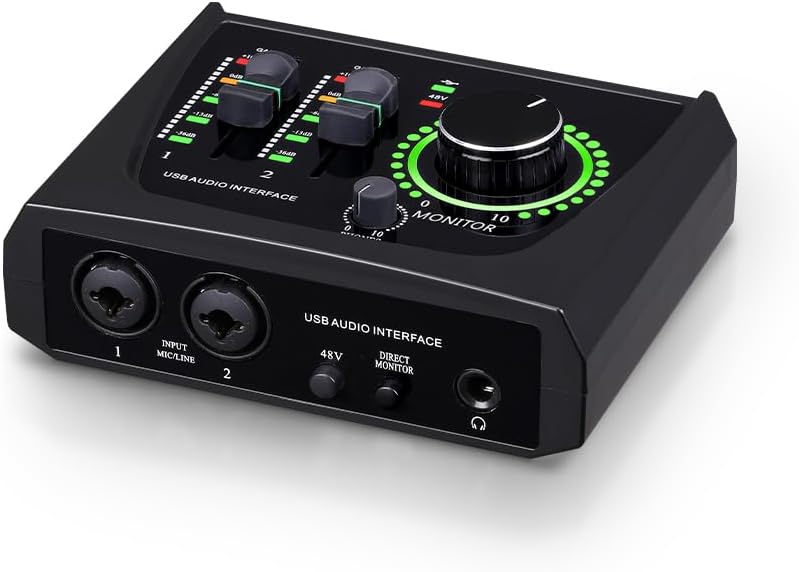
BOMGE mini 2 Channel USB Audio Interface for Recording, Streaming and Podcasting, with XLR/48V Phantom Power,Studio Quality Audio Interface for Guitarist, Vocalist, Podcaster or Producer
A compact two-channel USB interface with an XLR input and 48V phantom power, positioned for recording, streaming, and podcasting work.
Visit on Amazon
Step By Step Mixing: How to Create Great Mixes Using Only 5 Plug-ins
A book on building mixes with a deliberately small plug-in set, useful once the tracking side of the setup is already handled.
Visit on AmazonPrices and availability may change. Check the retailer for current details.
How these products were compared
This guide compares preamp type, input and output count, connectivity and expansion options, phantom power support, and headphone output provision. Product names, images, and retailer links are matched by product identifier so that every card points to the product shown.
Nothing here should be read as a hands-on measurement. The distinctions come from the published product descriptions and the feature sets those descriptions establish. No current price is printed anywhere in this article, so use the call to action on any card to confirm current price and availability before you commit.
How to choose the right USB audio interface
Start with channel count, and be honest about it. A two-input interface handles a vocal and a guitar, a stereo keyboard, or a single host plus one guest on a podcast. An 18x20 interface like the Behringer UMC1820 exists for drum tracking, multi-mic guitar cabinets, or a band playing together, and it brings ADAT I/O so an external preamp can extend the channel count later. Buying more inputs than your sessions need mostly means paying for preamps that sit idle.
The preamp is the part you hear. Two interfaces with similar converter specs can behave very differently when you push the gain, which is why the Midas mic preamplifiers in the Behringer units and the Audient Class A console preamp in the iD4 MKII are the headline features on those boxes rather than a bullet point about sample rate. Match the preamp to the microphones you actually own. A gain-hungry ribbon or a quiet dynamic mic will tell you quickly whether the preamp has usable headroom at the top of its range.
Connectivity decides how long the interface stays on your desk. USB-C, as used on the Audient iD4 MKII, is the cleaner long-term bet for a newer laptop, while USB-B style connections remain common and perfectly workable. If your computer has limited ports, plan the whole chain, including any external drive, before you buy.
Expansion is the quiet decider. The Mackie Onyx Producer 2X2 includes MIDI input and output, which matters if a keyboard or hardware synth is part of your workflow, since that removes a separate MIDI adapter from the desk. The Behringer UMC1820 adds ADAT I/O on top of its channel count. Interfaces without either are not worse, they simply expect you to solve those problems elsewhere.
Finally, think about phantom power and headphones together. Phantom power is what lets a condenser microphone work at all, and the BOMGE mini and the Behringer units include it. Two headphone outputs, as on the iD4 MKII, change how you run a session with a guest or a second performer, because nobody has to share a splitter. A headphone amp that stays clean at low volume matters more than most buyers expect, especially with high-impedance headphones.
If your weak point is the mix rather than the capture, the Step By Step Mixing book is a different kind of purchase. It sits in this list because the tracking chain is only half the job, and it deliberately limits itself to a small plug-in set instead of assuming a fully stocked collection.
Audient Audio Interface iD4 MKII
The iD4 MKII is built around an Audient Class A console microphone preamp, which is the reason it takes the top slot here. The rest of the feature set supports that: high speed USB-C for the connection to your computer, monitor mix and monitor panning controls for balancing what you hear, two headphone outputs, and compatibility with Mac, PC, and iOS. For a two-input home studio, that combination covers the daily workflow of tracking one source at a time and monitoring without workarounds.
The trade-off is scope. It is a two-input interface with no MIDI I/O and no ADAT expansion listed, so it is not the right answer for a drummer who needs eight channels at once, or for someone whose rig depends on hardware MIDI. It is also the kind of purchase worth making deliberately rather than by default, because its value is concentrated in preamp quality and monitoring flexibility rather than in channel count. If those two things are what your sessions actually need, the math works. If you need inputs, look at the UMC1820.
Alternatives to consider
The Behringer UMC202HD is better suited to a first or second interface where the budget is tight and the requirement is simple: two inputs, Midas mic preamplifiers, and 24-bit/192 kHz conversion for microphones and instruments. The Behringer UMC1820 is a stronger fit when you need to track many sources at once, since it offers 18x20 connectivity, Midas preamplifiers, MIDI, and ADAT I/O for future expansion.
The Mackie Onyx Producer 2X2, the BOMGE mini, and Step By Step Mixing cover the remaining ground. The Mackie is the pick when MIDI input and output belong on the interface itself. The BOMGE mini is the smallest and simplest option in the group, a two-channel USB interface with an XLR input and 48V phantom power for recording, streaming, and podcasting. The book addresses the mixing stage rather than the hardware.
Day-to-day use and maintenance
Set your levels before you get creative. Aim for healthy meters that never touch clipping, then listen, because a preamp that sounds good at a conservative setting will still sound good after you add compression, while a clipped take never recovers.
Phantom power deserves a habit, not a guess. Turn 48V on only for microphones that require it, and turn it off before connecting or disconnecting a ribbon microphone. If you use a condenser that draws significant current, be aware that bus-powered interfaces depend on a healthy USB port, and a flaky hub or an overloaded laptop port is a common source of intermittent dropouts.
Treat cables and jacks as wear items. Headphone jacks are the first thing to fail on any interface, so avoid hanging a cable from the plug and unplug by the connector body rather than the cord. Keep the unit somewhere with airflow, and check the manufacturer's driver and firmware updates periodically, since driver behavior affects stability and round-trip latency far more than a chip spec does. When you finish a session, lower the monitor level before powering anything down so the next session does not start with a surprise.
Buying checklist
- Count the inputs your busiest realistic session needs, then add one.
- Choose the preamp type based on the microphones you already own.
- Confirm the connection type matches your computer's available ports.
- Verify that the exact model includes phantom power if you use condensers.
- Check whether you need MIDI I/O or ADAT expansion, and pick accordingly.
- Confirm the headphone output situation, including how many performers need to listen.
- Verify the current retailer price, availability, and return terms before ordering.
Final recommendation
Choose the Audient iD4 MKII when preamp quality, USB-C connectivity, and flexible monitoring for two inputs are the priorities, and when you do not need MIDI or ADAT expansion. Choose the Behringer UMC202HD when you want a two-input interface with Midas preamplifiers at the lowest sensible entry point, and step up to the Behringer UMC1820 when channel count and ADAT expansion are the real requirement. Pick the Mackie Onyx Producer 2X2 if MIDI belongs on the interface, the BOMGE mini for the simplest compact recording and streaming setup, and Step By Step Mixing if the gap in your results is in the mix rather than in the capture.