I keep a drawer of interfaces with fried headphone jacks, and that drawer is why I compare home studio audio interfaces the way I do: not by the badge on the box, but by four questions. Does the preamp stay clean when the gain is at three o'clock? Do the drivers hold a round-trip under 10ms on a mid-range laptop? Does the headphone amp drive a pair of 250-ohm cans without folding? And will it run on bus power from a port that is already feeding a controller and a phone?
The four items in this comparison do not answer those questions the same way, because they are not the same kind of product. The IK Multimedia iRig 2 is a pocket adapter for getting a guitar into an iPhone or iPad. The Mackie Onyx Artist 1-2 is a desktop 1x2 with an Onyx preamp. The Elgato Wave XLR MK.2 is a voice-first interface with an onboard DSP mixer. And the DJ controller case is a case, sized for a Pioneer DDJ-FLX4 or a Numark Mixtrack Platinum FX. It makes no sound at all. It earns its row because the controller it protects is itself an audio interface, and because plenty of people buy the interface first and wreck it in a bag second.
One honest note on scope: this is a fit comparison, not a 40-hour review. My rule for reviews is 40 hours of real recording across multiple mic types, and I will not fake that here. What I can tell you is what each box is built to do, where it belongs in a signal chain, and who I would hand it to.
The short answer: for most home studios, the Mackie Onyx Artist 1-2 is the pick if you record instruments and mics, the Elgato Wave XLR MK.2 is the pick if you record voice, the iRig 2 is the pick if your studio is a phone, and the case is the pick if you already own one of the two controllers it fits.
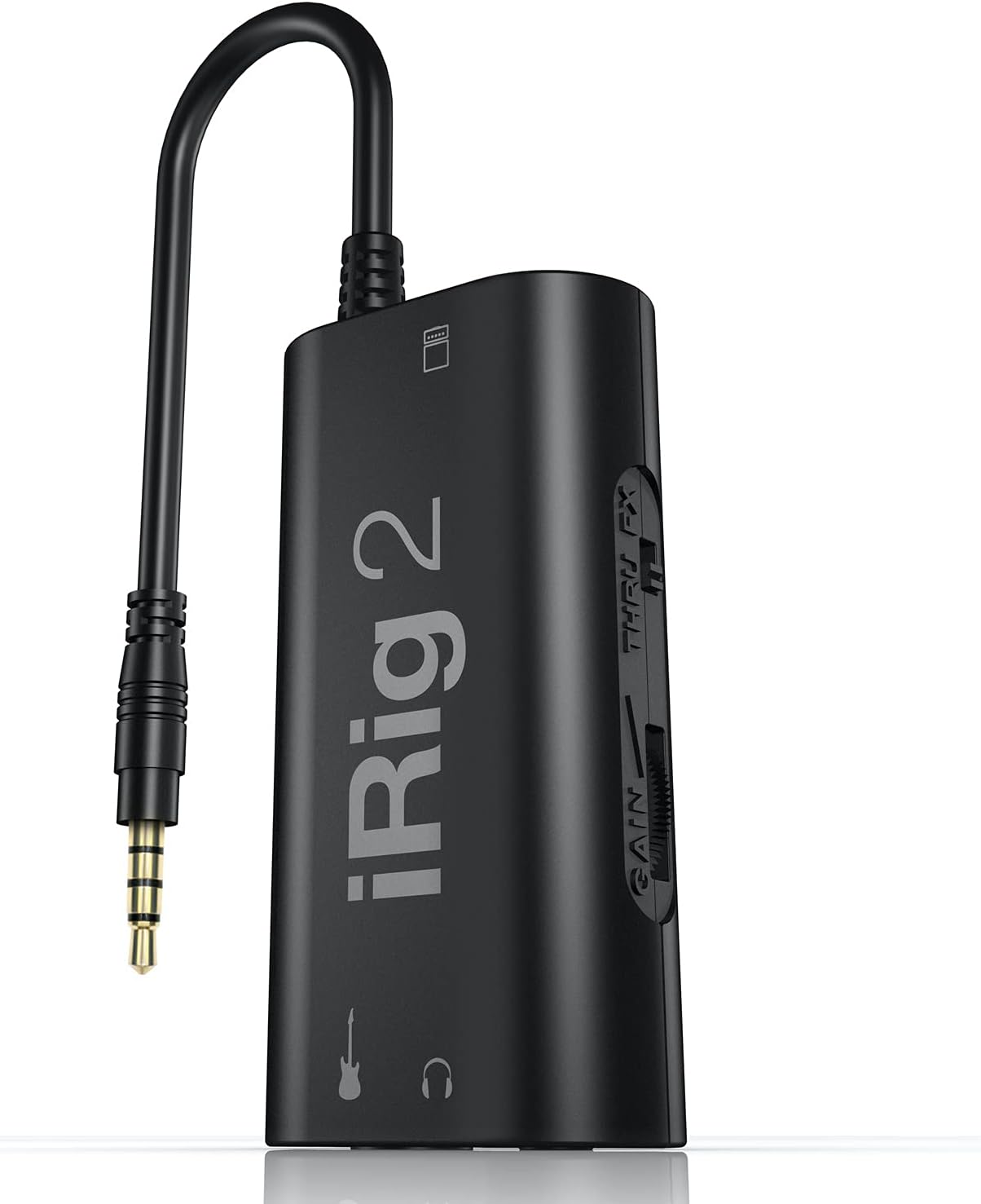
IK Multimedia iRig 2
Pocket-sized, instrument input plus headphone and amplifier outs, works with the phone or tablet you already carry
Guitar only: one input, no microphone channel, cannot record two sources at once
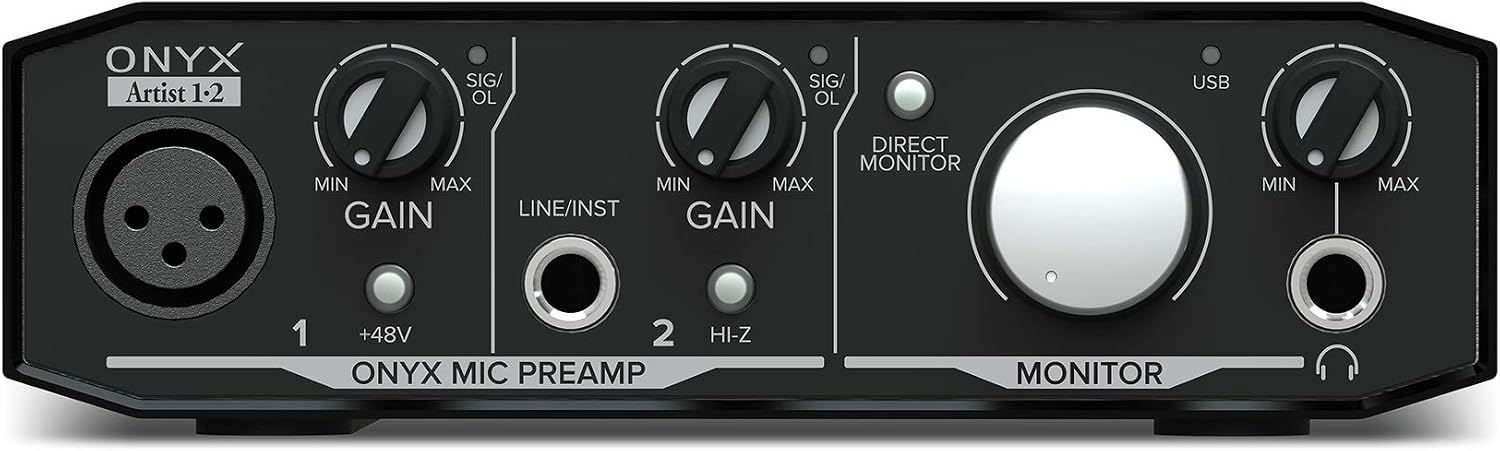
Mackie Onyx Artist 1-2
Onyx preamp, one mic channel plus one instrument channel, stereo outs for monitors
Two channels only, so it will not cover a drum kit or a full band
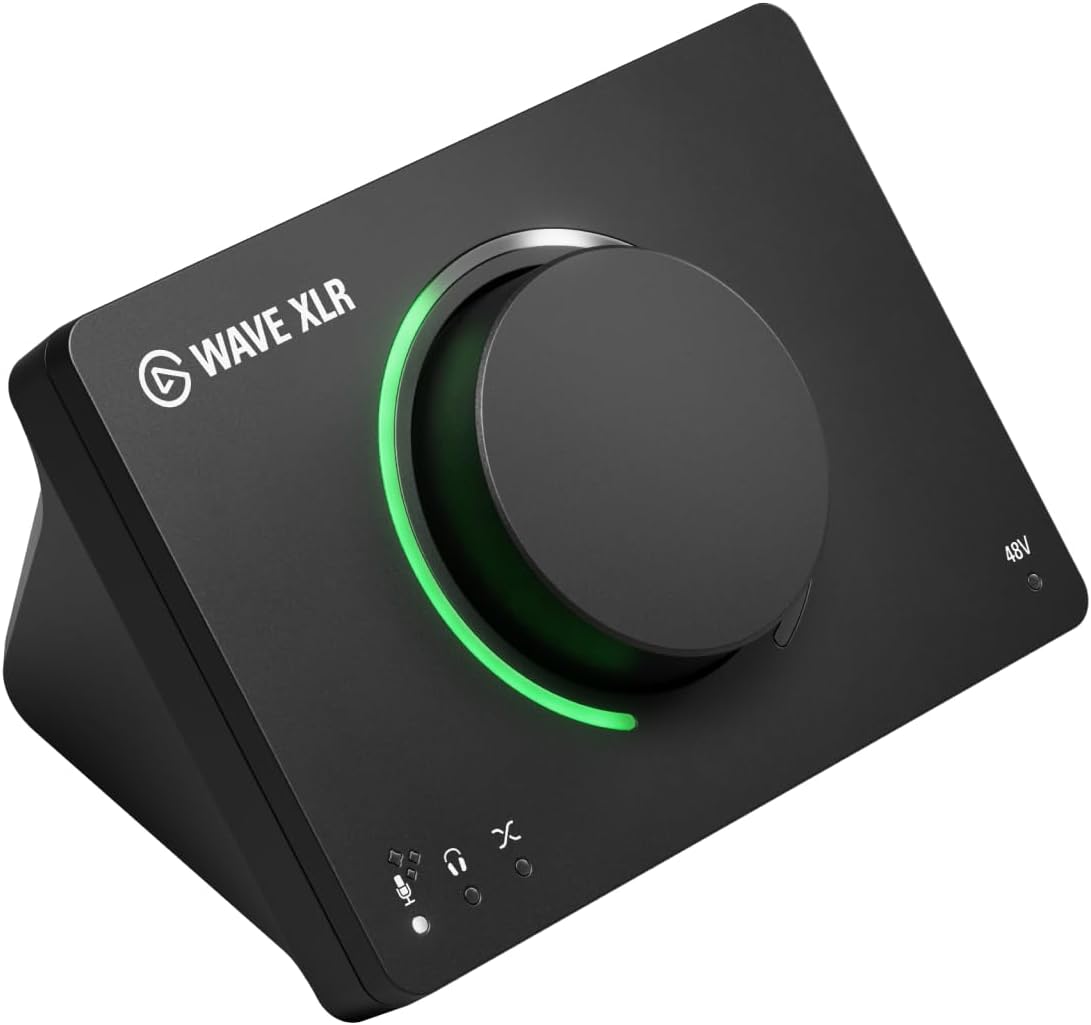
Elgato Wave XLR MK.2
XLR input plus an onboard DSP mixer, so a voice sounds finished before it reaches your software
Built around one voice channel, so it is not the pick for tracking a guitar and a vocal together
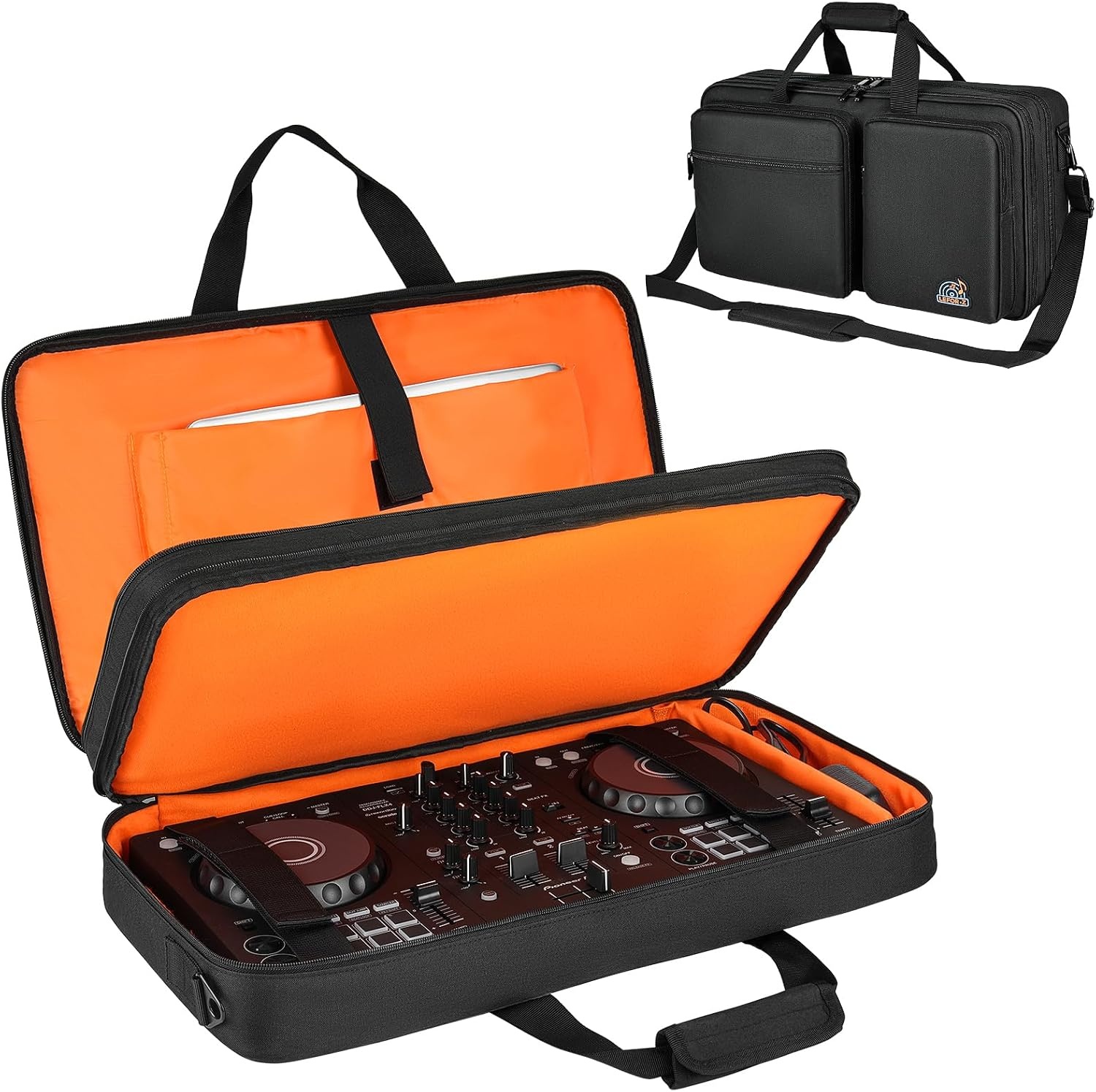
DJ controller case
Protects the faders and jacks on a controller that is already a working audio interface
Makes no sound, and it only fits the specific controllers in its fit list
Prices and availability were captured from Amazon Creators API and may change.
What actually decides this comparison
Gain staging. The preamp is the interface. Two boxes with identical published specs can sound completely different at three o'clock, because one gets grainy and the other stays open. A preamp that falls apart early forces you to back the gain down, and now your ribbon mic is hissing and the whole take is thin. In this group, the Onyx Artist 1-2 is the one with a dedicated mic preamp to gain-stage. The iRig 2 hands that job to your guitar's output level and your picking hand. The Wave XLR MK.2 is built around a single spoken-word mic at a fixed distance.
Drivers, not chips. Latency is a driver problem. A great converter with lazy drivers is a paperweight, and a mediocre converter with boring, stable drivers will out-record it every time. An adapter that feeds a phone or tablet inherits that device's audio stack, so your round-trip is the app's problem as much as the hardware's. The two USB interfaces here are the ones where the manufacturer's driver work shows up in your session.
The headphone amp. Nobody reads this spec until it clips. If you mix on 250-ohm cans, a weak headphone out means you turn it up, it distorts, and you mix into distortion for an hour before you notice. I would rather track on a boring interface with a solid headphone amp than a fancy one with a crackly knob.
Bus power. USB bus power is fine until it is not. A hungry condenser on phantom power, a controller, and a phone all hanging off one laptop is a gamble. If your sessions are mobile, count your ports before you count your inputs.
Mix-minus. If you record two-person podcasts, the routing that lets a guest hear everyone except themselves matters more than any spec on this page. A voice-first interface with a DSP mixer is built for exactly that job.
IK Multimedia iRig 2: the pocket interface
The iRig 2 is not competing with the other two interfaces here, and that is the point. It is a lightweight adapter for iPhone and iPad with an instrument input and headphone and amplifier outs. You plug a guitar in, you plug headphones in, you open an amp app, and you are playing through a rig that fits in a jacket pocket. The instrument input and the headphone and amplifier outs are the entire feature list. There is no second channel and no rack of drivers to install.
That makes it the right answer to a narrow question: how do I get my guitar into my phone without carrying a bag? For songwriting on the couch, silent practice, or sketching a riff in a hotel room, that is worth having. It is the wrong answer to "I want to record a vocal and a guitar at the same time," because it cannot do that.
Mackie Onyx Artist 1-2: the desk interface
The 1x2 name tells you the layout: one channel for a microphone, one for an instrument, two outputs to your monitors. The Onyx preamp is the reason to buy it. Mackie built its reputation on these preamps, and in a small home setup the preamp is doing most of the tonal work before anything digital ever touches the signal.
If you write songs with a guitar in one hand and sing into a mic, this is the shape you want, because you can leave both plugged in and switch between them instead of crawling behind the desk. It also gives you a proper headphone output and a monitor path, which is the difference between a real monitoring setup and headphones hanging off a laptop.
What it is not is a streaming box. If your plan is to route game audio and a mic into one stream, that is the job the Elgato Wave XLR MK.2 is built for, not this one. The Onyx Artist 1-2 is a tracking interface, and it is happiest doing one job well.
Elgato Wave XLR MK.2: the voice interface
Elgato builds for people who talk into microphones for a living, and the Wave XLR MK.2 is the clearest expression of that: a USB audio interface and DSP mixer with an XLR input, designed so a single microphone sounds finished before it ever reaches your recording software. The DSP mixer is the feature that separates it from the other two. Instead of routing everything through your DAW and hoping the plugin chain holds up during a three-hour stream, you set your tone and levels on the interface itself.
If your sessions are podcasts, voiceover, or streams, that is a better use of money than inputs you will never plug anything into. A two-person show does not need eight inputs. It needs two good ones and a mix-minus that works. The Wave XLR MK.2 is aimed at the person who wants one excellent channel rather than several average ones.
The trade-off is focus. This is a voice-first box, so if you also want to track a guitar DI and a vocal at the same time, with the gain staging that demands, look at the Mackie instead.
The DJ controller case: not an interface, still worth the row
I will say the obvious thing: this is a case. It fits a Pioneer DDJ-FLX4 or a Numark Mixtrack Platinum FX, and it protects the faders, jacks, and knobs on a controller that is already a working audio interface in its own right. A DJ controller does the same job as the boxes above. It converts audio, it has outputs for a PA, and it lives or dies on its jacks.
That is why it belongs in a comparison about interfaces. The most common failure I see in small setups is not a blown converter. It is a bent jack or a snapped fader on a controller that got thrown in a car. Protecting the interface you already own is better insurance than replacing it.
Buy it after the interface, not instead of it. And check the fit list before you order, because "DJ controller case" covers a lot of shapes.
How the trade-offs stack up
Two of these are real interfaces, one is a guitar adapter, and one is a bag. Sorting them that way is the fastest way to spend your money well.
If you record instruments and vocals at home, the Onyx Artist 1-2 gives you the preamp and the two-channel layout you will actually use, and it is the one I would put on a desk and leave there. If you record voice, the Wave XLR MK.2 puts the money into one channel and a DSP mixer instead of inputs you will not use, which is the correct trade for a podcast or a stream. If you want to play guitar through your phone, the iRig 2 does that and nothing else, and nothing else does it as simply. And if you already own a DDJ-FLX4 or a Mixtrack Platinum FX, the case is the best insurance in this article.
Where each one loses: the iRig 2 cannot record two sources at once, and it will never be a studio front end. The Onyx Artist 1-2 tops out at two channels, so it is not a band rig. The Wave XLR MK.2 is voice-first, so guitarists who want instrument-level gain staging should look elsewhere. The case makes no sound and solves no routing problem, so it is never the answer to "my recordings sound bad."
Who should buy which
- Buy the IK Multimedia iRig 2 if you play guitar and your recording device is an iPhone or iPad. Songwriting, practice, riffs on the road.
- Buy the Mackie Onyx Artist 1-2 if you record a mic and an instrument at home and want a preamp worth the desk space.
- Buy the Elgato Wave XLR MK.2 if you record voice: podcasts, streams, voiceover, narration.
- Buy the DJ controller case if you already own a Pioneer DDJ-FLX4 or a Numark Mixtrack Platinum FX and you move it.
Before you click buy
Four things I would check first. One: driver support for your operating system, and whether the manufacturer still updates it. Two: whether the interface will run on bus power alone, because a separate supply for phantom power is a nuisance on the road. Three: the headphone output, especially if you mix on high-impedance cans. Four: the return window, because latency problems on your specific laptop are not something a spec sheet can promise away.
And read the fit list on the case twice. A controller case that is a centimeter too tight is worse than no case at all.
The interface is maybe 10% of how your recording sounds, and I say that as someone who has spent a decade chasing the other 90%. But it is the 10% you touch every single session, so pick the one that matches the work you actually do, not the one with the longest feature list.