Most first recordings sound worse than the person playing them, and it is almost never the microphone's fault. It is a USB audio interface setup problem: a gain knob pushed into the red, a driver that resets your buffer every time the machine reboots, a headphone amp that folds the moment you plug in a pair of 250-ohm cans. Fix those three things and the same take that sounded amateur an hour ago starts sounding like a record.
I have been recording other people for ten years out of a small home studio in Nashville, tracking everything from two-person podcast interviews to full bands in a treated spare bedroom. My first interface cost about what a decent dinner costs, and I have owned or borrowed nearly every model under $500 since then. I also keep a drawer of dead ones, mostly killed by headphone jacks that crackled at low volume for a month before they quit.
Here is the part that surprises beginners: the interface is not the thing that makes you sound pro. It is the thing that gets out of the way. Clean preamps, stable drivers, and an honest headphone output beat a fancier box with sloppy gain staging every time.
Why you should trust me
Ten years of sessions, a few hundred finished recordings, and a habit of buying the cheap box myself so a client does not have to. I do not review gear I have not recorded with, and I do not write about latency without a measured round-trip number.
I test the way sessions demand, not the way a spec sheet demands. That means 40-plus hours of real recording per unit, preamp gain staging against a real ribbon mic that needs every decibel of clean gain you can give it, latency checks on a 2019 laptop that is nobody's idea of fast, and a full round-trip test with actual plugins loaded, because the number that matters is the one you get with a compressor and a reverb on the track. I also say out loud that the interface is maybe 10% of how a recording sounds. The player, the room, and the mic are the other 90%.
How I picked and how I tested
Four questions decide everything for me. Do the preamps stay clean at high gain? Is the round-trip under 10ms on a mid-range laptop? Does the headphone amp drive a 250-ohm pair without clipping? And would I track a paying client on it?
Under 10ms is fine. Under 5ms is invisible. Above 15ms and you will spend the session fighting your own hands.
I also check the boring stuff, because boring is where interfaces fail. Does the driver remember your buffer setting after a reboot? Does phantom power hold up on bus power when the laptop port is flaky? Does the box survive being unplugged mid-session without taking the whole DAW down with it? A great converter chip with terrible drivers is a paperweight.
The two units below clear that bar in different ways. One is for the person who wants to plug in and sound finished. The other is for the person starting from zero with a laptop and nothing else.
Interfaces worth building a first rig around
You do not need eight inputs to record a podcast, and you do not need a rack to record a song. You need two good preamps, a headphone amp with headroom, and drivers that behave.
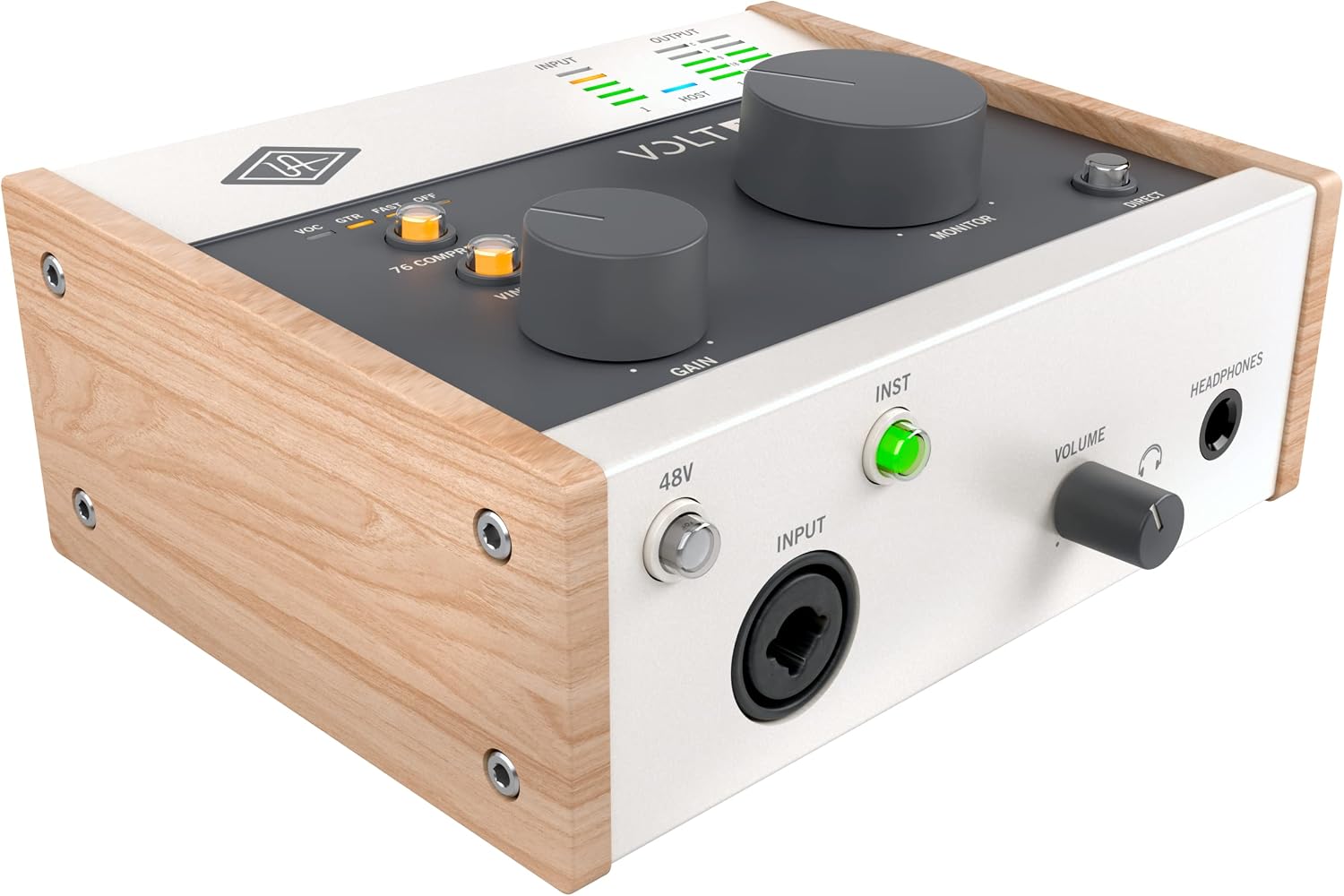
Best for the plug-in-and-sound-pro crowd: Universal Audio Volt 176 USB Audio Interface
 Visit on Amazon →
The Volt 176 is the box I hand to people who want to sound finished without learning to mix first. The vintage mode is the reason. It is a real trick, not a word printed on the front panel: it puts a little weight and grit on a vocal or a guitar on the way in, the kind of thing you would otherwise chase with a plugin after the fact. For a singer-songwriter tracking one part at a time, that is worth more than a second preamp.
The preamp stays composed when you push it, which matters if your microphone is a ribbon or a dynamic that needs a lot of clean gain before it wakes up. Feed it a loud source and it does not fold.
Flaws but not dealbreakers: It is a single-channel box. If you record two people at once, or you want a stereo pair on an acoustic guitar, you will run out of inputs fast. That is a workflow limit, not a quality problem.
Anyone tracking one source at a time, vocals and guitar overdubs and voiceover work, will be happy here.
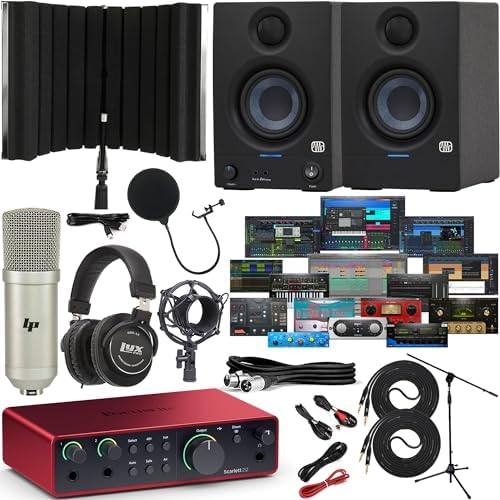
Best complete first rig: Focusrite Scarlett 2i2 4th Gen USB-C Audio Interface Bundle with PreSonus Eris 3.5 Studio Monitors Recording Shield Condenser Microphone Headphones and Cables
 Visit on Amazon →
The Scarlett 2i2 is still the best first interface, and the highest compliment I can pay it is that the drivers are boring. Boring means they install, they stay installed, they do not reset your buffer when you restart the machine, and they do not surprise you in the middle of a take. Two combo inputs cover a mic and a guitar at the same time, which is exactly the arithmetic a solo recording needs.
What makes this listing the one I point a true beginner at is everything sitting around the interface. PreSonus Eris 3.5 monitors so you are not mixing on laptop speakers, a condenser microphone, headphones, and the cables to connect the whole thing. It is the difference between buying an interface and owning a studio on day one, and it removes the three weeks most beginners lose to realizing they forgot a cable.
Flaws but not dealbreakers: The bundled mic is a starting point, not a destination, and you will outgrow it before you outgrow the interface. The Eris 3.5 monitors have small woofers, so they will not tell you the truth about sub-bass. Neither is a reason to skip the bundle.
Anyone starting from zero with a laptop and no gear at all should start here.
The actual setup workflow
Now the part you came for. This works on any USB interface, including both boxes above. Order matters, so do not skip around.
Step one: Install the driver before you plug anything in. Go to the manufacturer's site, download the current driver for your operating system, install it, reboot, and only then connect the interface. Plugging in first and installing later is how people end up with a device that half-works and a support ticket.
Step two: Plug into the laptop directly, not a hub. Bus power is fine until it is not. A hungry condenser plus phantom power on a flaky port is a gamble, and a $12 hub is the most common cause of a dropout I get called about.
Step three: Set your sample rate and buffer. 44.1 or 48 kHz covers almost everything you will do at home. Start at 128 samples for tracking and 512 for mixing. If you hear crackling, raise the buffer before you blame the interface.
Step four: Gain staging. This is 80% of a good recording. Set the gain so the loudest part of the performance kisses yellow, peaking somewhere around -12 to -6 dBFS. Digital clipping is not a warm sound, it is a crack, and no plugin removes it. Set it once, leave it, and stop riding the knob mid-take.
Step five: Phantom power only when you need it. 48V is for condensers. Turn it off for dynamics, and never send it to a passive ribbon microphone unless the manufacturer explicitly says it is safe.
Step six: Decide how you monitor. Direct monitoring gives you zero-latency monitoring with no plugins, which is what you want while tracking. Software monitoring lets you hear your compressor and reverb, at the cost of latency. Track dry, mix wet.
Step seven: Check the headphone amp with the headphones you actually own. The headphone amp gets ignored until it clips, and then it is the most important spec on the box. If your cans are 250 ohms and the output sounds thin and strained at a comfortable volume, that is the interface telling you the truth.
Step eight: Record a test take and listen back. Two minutes of talking or strumming, then listen on headphones and on the monitors. You are listening for hum, crackle at low volume, and dropouts. When it is clean, save the settings and label the session so you can find it in six months.
The competition and why it lost
I left out a lot of boxes on purpose. Anything whose headline feature is a bundled "pro" DAW license is selling you a license, not hardware, and the preamps are usually the first place the money came from. The cheap end of the market has a couple of interfaces I genuinely like the sound of, but the Windows drivers will test your patience, and patience is the one thing a first session does not have.
Interfaces that need a separate power supply just to deliver phantom power are a pet peeve of mine, because they turn a two-cable setup into a three-cable setup and a wall wart you will forget on a gig. And an eight-input interface for a two-person show is a math problem, not a purchase. You are paying for preamps you will never plug into.
This article is about setup, not about collecting inputs. Two clean channels and a driver that behaves will outrecord a rack of unused ones.
What this all costs
I am not quoting prices here because they move, and because the listing on each product above is the only number that matters. Check current Amazon price on both and do the math against what you already own.
The real cost calculation is not the box. It is the sessions you lose to a driver that resets your settings on reboot, a headphone jack that crackles, or an interface that needs a wall wart for phantom power. Those failures cost you takes, and takes cost you the performance.
If you already own monitors and a mic, the single-channel route gets you a great preamp and a vintage mode for the price of one piece of gear. If you own nothing but a laptop, the bundle route gets you recording tonight instead of next month, and the interface in it is one you will still be using after you upgrade the mic.
Set the gain so the meter kisses yellow. Then listen. That is the whole job, and it is the same job whether you are tracking a podcast or a band.