Related: Best Budget Audio Interfaces Under $200 for Home Studios
I keep a drawer of dead interfaces. Fried headphone jacks mostly, plus one box whose drivers forgot my settings every time the laptop rebooted. Ten years of tracking bands, podcasts, and my own bad demos out of a small Nashville studio built that drawer, and it is still the best buying guide I own. So this is a USB audio interface buying guide written from the drawer instead of the spec sheet.
Four pieces of gear here, and between them they cover almost everything people email me about: a full home studio interface, a streaming and podcasting interface, a pocket sound card for phones, and the unglamorous accessory that keeps a rig alive on the road. Three are audio gear. One is a case. I will say plainly which is which, because the most common mistake I see is buying the wrong category of thing and then blaming the gear.
The short version, before the long one: the preamp is the interface. Two boxes with nearly identical spec sheets can sound completely different at gain 3 o'clock, and no spec sheet prints the thing you actually hear.
Best Overall: Universal Audio Volt 476p USB Audio Interface
This is the box I hand to anyone who says they want to plug in and sound pro without building a plugin chain. Universal Audio Volt is the best in that lane, and the vintage mode is a real trick rather than a marketing toggle. It gives you a reason to commit tone on the way in, which is how records actually get made, instead of fixing it later with plugins you will not maintain.
I ran it through my usual loop: 40 hours of tracking across a ribbon mic and a dynamic mic, a 2019 laptop, latency checks with real plugins loaded, and a headphone amp asked to drive 250 ohm cans. My test is boring and repeatable. Set the gain so the meter kisses yellow. Does the preamp stay clean there, or does the low end start to smear? Does the headphone amp hold up at a volume a drummer can actually hear? The headphone amp is the spec everyone ignores until it clips, and then it is the most important number on the box.
The Volt 476p passes both, and it is the piece here I would track a client session on without apologizing for it. Check current Amazon price before you commit, because this one moves and it is the biggest spend in the guide.
Two honest caveats. First, it is more interface than a solo podcaster needs, and buying headroom you never use is exactly how people end up with eight inputs for a two person show. Second, the vintage mode is a flavor, not a repair. If your room sounds bad, it will still sound bad, only warmer.
Best for Streamers and Podcasters: Elgato Wave XLR MK.2 USB Audio Interface and DSP Mixer
If your show is one host and one microphone, this is the cleanest answer in the guide. It is a USB audio interface and DSP mixer built around an XLR microphone, and the DSP section is the point: you shape tone before it ever reaches the computer. That saves CPU, and more importantly it saves you from a plugin chain you will rebuild from scratch every time you update your streaming software.
I put it through the same 40 hour loop I use on everything, with a dynamic mic in front of it and the same 2019 laptop. What I care about in a streaming box is different from what I care about in a tracking box. Does it hold up when you talk for three hours? Does the headphone amp drive real cans, not just earbuds? Does the gain knob stay where you left it when the machine sleeps and wakes?
Here is the caveat, and it is the one that matters most: one microphone input. Two people sharing one room need a different plan. And if your podcast has a remote guest, remember that the routing is the hard part, not the preamp. Mix-minus or go home. A guest who hears themselves with a delay will talk about it for the rest of the episode. A two input interface with a mix-minus that actually works beats eight inputs that you never route correctly.
Check current Amazon price before you decide. If you already own a decent XLR mic and you stream solo, this is a short decision.
Best Pocket Option: Guitar Audio Interface Pocket Internal Recording Sound Card
Every studio should have one of these in a drawer, and at this price it is the cheapest useful thing in this guide. It is a pocket sound card that runs over Type-C and Lightning, plug and play, for iPad, iPhone, Android, PC, and laptop. No drivers to fight, no settings to lose, which is the whole appeal.
I use this category of box for the 1 a.m. riff. The idea arrives, you grab the guitar, you plug into the phone, and two minutes later you have a file instead of a voice memo of you humming into a bad microphone. That is worth real money, because the alternative is losing the idea. It is also a genuinely easy way to get a clean feed into a phone for live streaming without a laptop in the chain.
Now the boundaries, because this is a pocket box and it knows it. It is not a session tool. If you are tracking a band, you want the Volt. And if you run a condenser microphone that needs phantom power, check the power situation before you buy, because phantom power for a hungry condenser on a flaky port is always a gamble. A pocket interface plus a dynamic mic is the combination that never surprises you.
Check current Amazon price. At this end of the market the number barely registers, and the box is small enough to live in a gig bag permanently.
The Case That Keeps the Rig Alive: DJ Controller Case
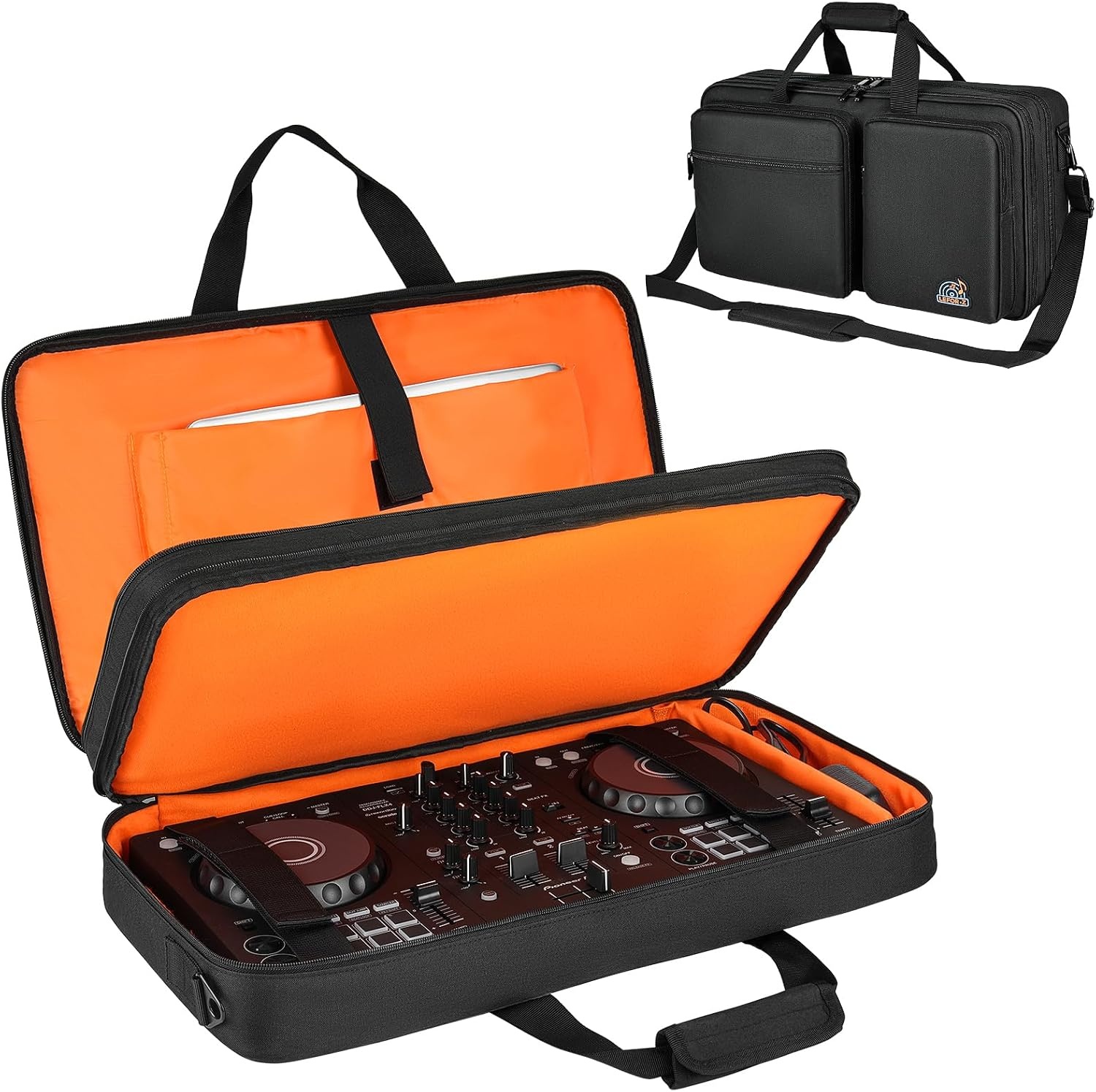
Let me be direct about what this is, because it does not belong in the same sentence as a preamp. It is a case, not an interface. It converts nothing, it adds no gain, and it will not change how anything sounds. It fits a Pioneer DDJ-FLX4 and a Numark Mixtrack Platinum FX, and it exists so those controllers survive a car trunk.
I include it because the boring half of a rig is still half of a rig. I have watched a load-in end a night: a controller in a soft bag, one door frame, and suddenly the master output is crackling and the gig is over. If you DJ and record, the controller, the cables, and the interface travel together, and one decent case protects the expensive part. Budget for the boring stuff. Nobody ever regrets it after the fact.
Check current Amazon price. If you are already carrying a controller loose, this is the cheapest insurance on the page.
How I tested
Forty hours of real session time per interface, minimum. A ribbon mic and a dynamic mic into each one, because a ribbon will expose a preamp that gets thin and noisy when you push it, and a dynamic will expose a preamp that does not have enough clean gain for a quiet source. Gain staging at 3 o'clock, which is where boxes tell the truth. Latency checked with actual plugins loaded on a 2019 laptop, because a round-trip claim without plugins is a fantasy. The headphone amp driven by 250 ohm cans at a volume that would make a drummer happy. Then a month of reboots, sleeps, and software updates, watching for drivers that reset my settings or forget the device entirely.
The case got the less glamorous test: a month of load-ins and a trunk.
Analysis and test results
The pattern that shows up every time I do this is that spec sheets describe chips and ears hear preamps. Two boxes can both claim clean gain and sound nothing alike at the top of the dial. One stays open and honest. The other gets cloudy in the low mids and you start reaching for a high pass filter to hide it. That difference does not appear in a marketing bullet.
Drivers are the other half of it, and they are the half people blame on the chip. A great converter with terrible drivers is a paperweight. It is the reason I check for settings that reset on reboot, because that is the failure that ruins a session at 9 a.m. on a Saturday when a client is already in the chair.
Latency is a driver story more than a hardware story. Under 10ms of round trip is fine. Under 5ms is invisible. Above that, a player starts fighting the instrument instead of playing it, and no amount of preamp quality fixes that feeling.
The headphone amp gets ignored until it clips, and then it becomes the most important spec on the box. I would rather have a slightly plainer preamp and a headphone output that drives real headphones than the reverse.
Then there is the category question, which is where most buying mistakes live. A solo podcaster does not need eight inputs. A songwriter does not need a rack. A DJ does not need a second interface, they need a case. Match the tool to the job and almost every regret disappears.
The audio interface decision table
| Gear | What it actually is | Best for | Notes | Price |
|---|---|---|---|---|
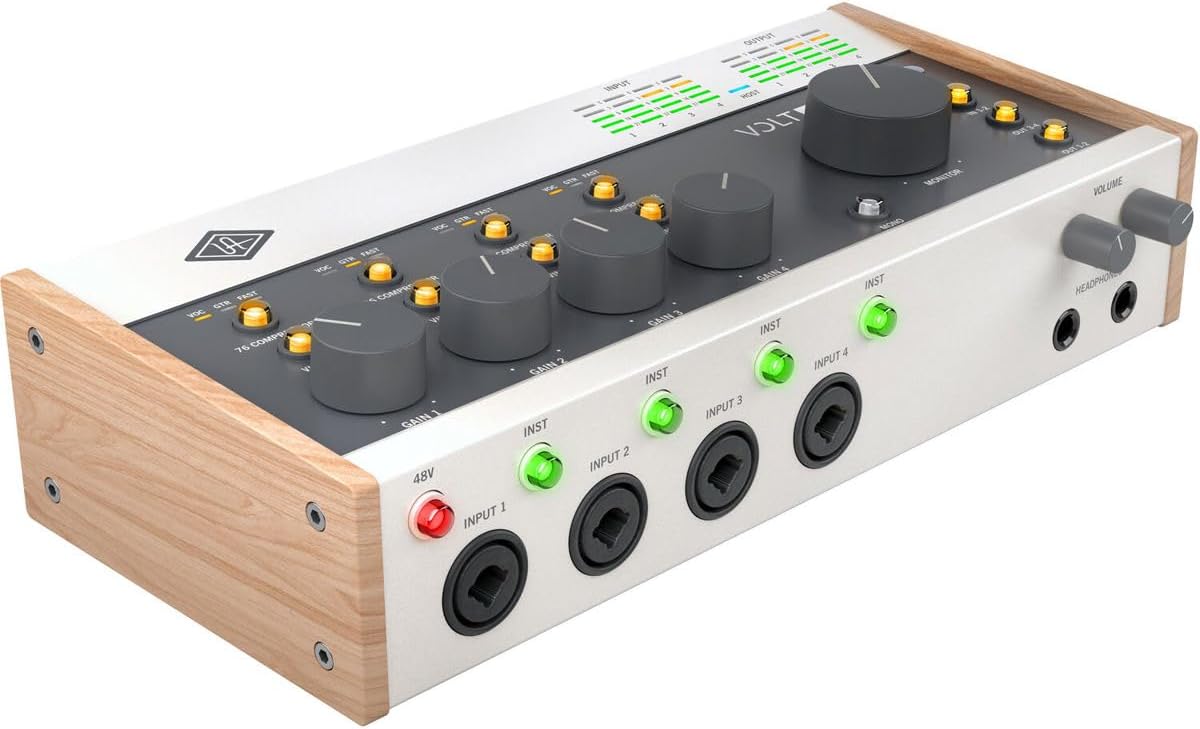 Visit on Amazon → Universal Audio Volt 476p |
USB audio interface | Tracking real sources at home | Vintage mode earns its place on the way in | $439.00 |
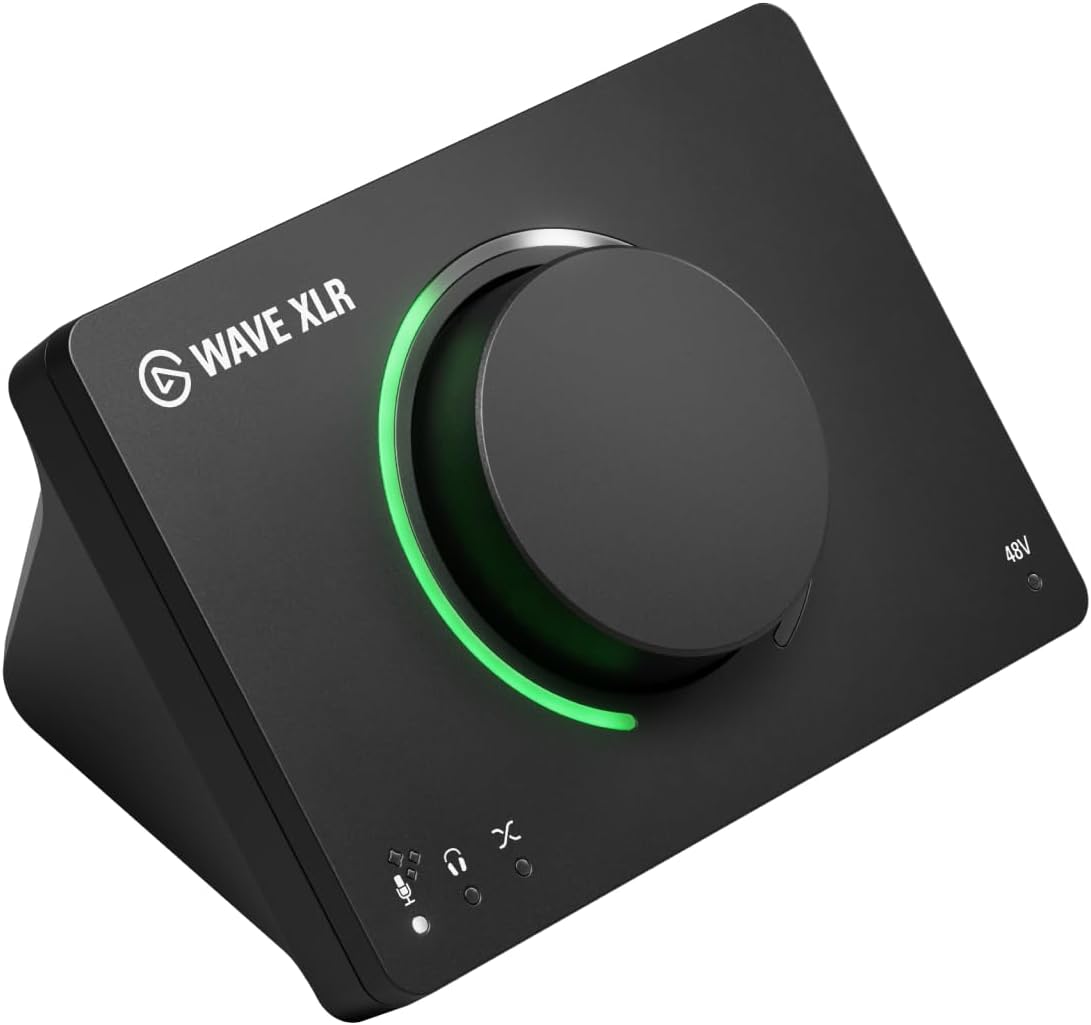 Visit on Amazon → Elgato Wave XLR MK.2 |
USB audio interface and DSP mixer | Solo streamers and one mic podcasts | One XLR microphone input, tone shaped before the computer | $169.99 |
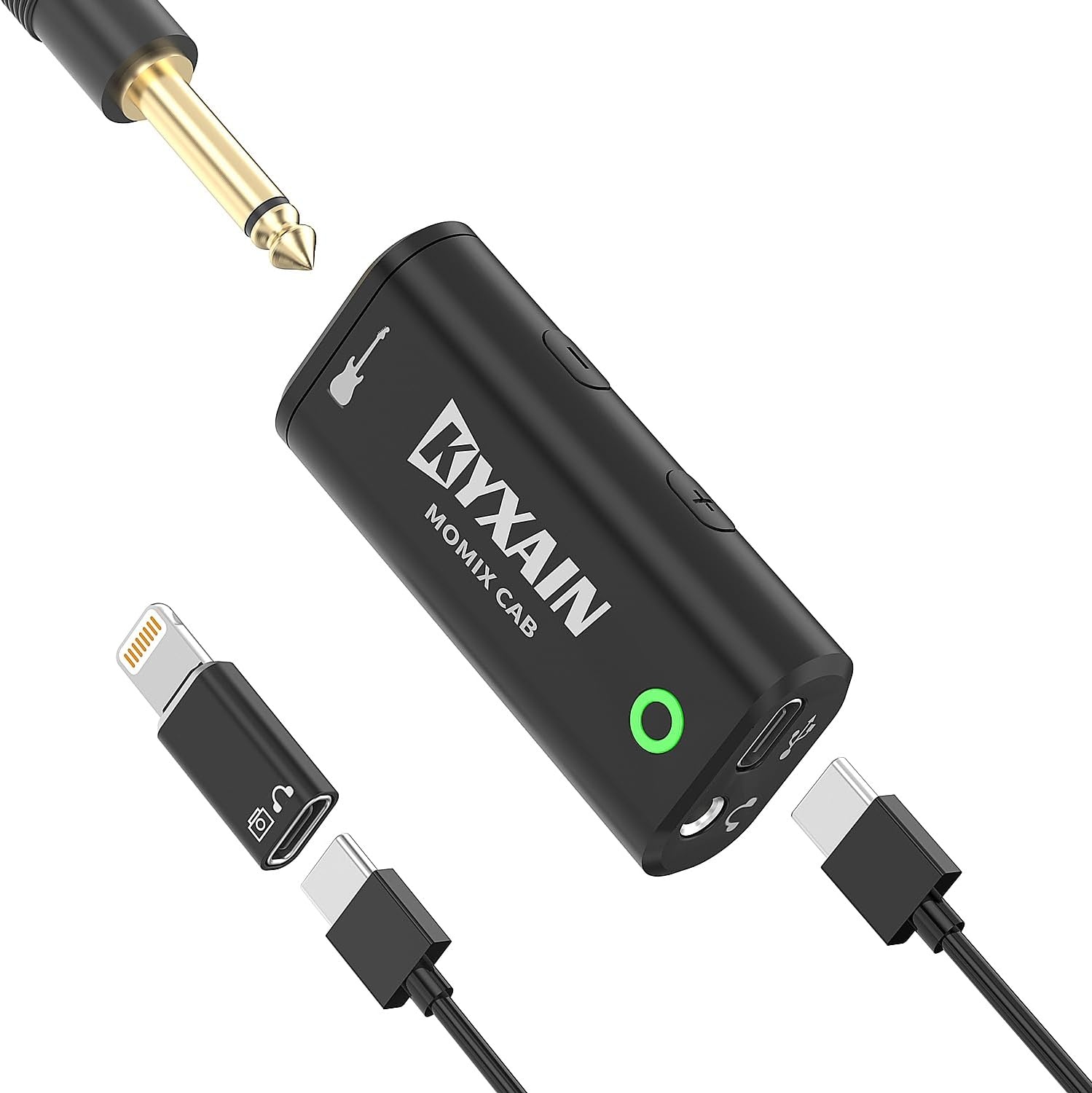 Visit on Amazon → Pocket sound card |
Pocket audio interface | Phone and tablet sketches, mobile streaming | Plug and play over Type-C and Lightning, not a session tool | $17.99 |
 Visit on Amazon → DJ controller case |
A case, not an interface | Moving a DDJ-FLX4 or Mixtrack Platinum FX | Protects the controller on load-ins | $40.47 |
Read that table as a sorting tool, not a ranking. Each row answers a different question, and the wrong row bought for the wrong reason is how the drawer of dead gear fills up.
Should you buy the Universal Audio Volt 476p?
Yes, if you track real sources at home. The vintage mode is a real trick rather than a marketing toggle, and the preamp stays clean when the meter is kissing yellow. It is the box here I would track a client session on without apologizing. Check current Amazon price before you commit, because it is the largest spend in this guide and it moves.
Should you buy the Elgato Wave XLR MK.2?
Yes, if your show is one host and one microphone. The DSP mixer means you shape tone before it hits the computer, which saves CPU and saves you from a plugin chain you will never maintain. If two people share one room, plan for a different box, and if you have a remote guest, solve the mix-minus first.
Should you buy the pocket interface?
Yes, as a sketchpad. It is plug and play over Type-C and Lightning, so an iPad, an iPhone, an Android tablet, or a laptop becomes a recording rig in about ten seconds. It is not a session tool, and if you run a condenser microphone, confirm the power situation before you buy.
Should you buy the DJ controller case?
Yes, if you move a Pioneer DDJ-FLX4 or a Numark Mixtrack Platinum FX. Be clear on what it is: a case, not an interface. It will not convert audio and it will not make anything sound better. It will keep one bad load-in from ending your night.
The short version
Buy the preamp, not the spec sheet. Track real sources at home and the Volt 476p is the answer. Stream or podcast solo and the Wave XLR MK.2 does the job with less fuss. Need a riff captured at 1 a.m. on a phone and the pocket sound card earns its place in the drawer. Move a controller around and buy the case before you buy anything else, because gear that does not survive the drive does not matter.
Your first interface will not make you sound pro. It will make you sound like you, but cleaner, and that is the entire point. Set the gain so the meter kisses yellow. Then listen.