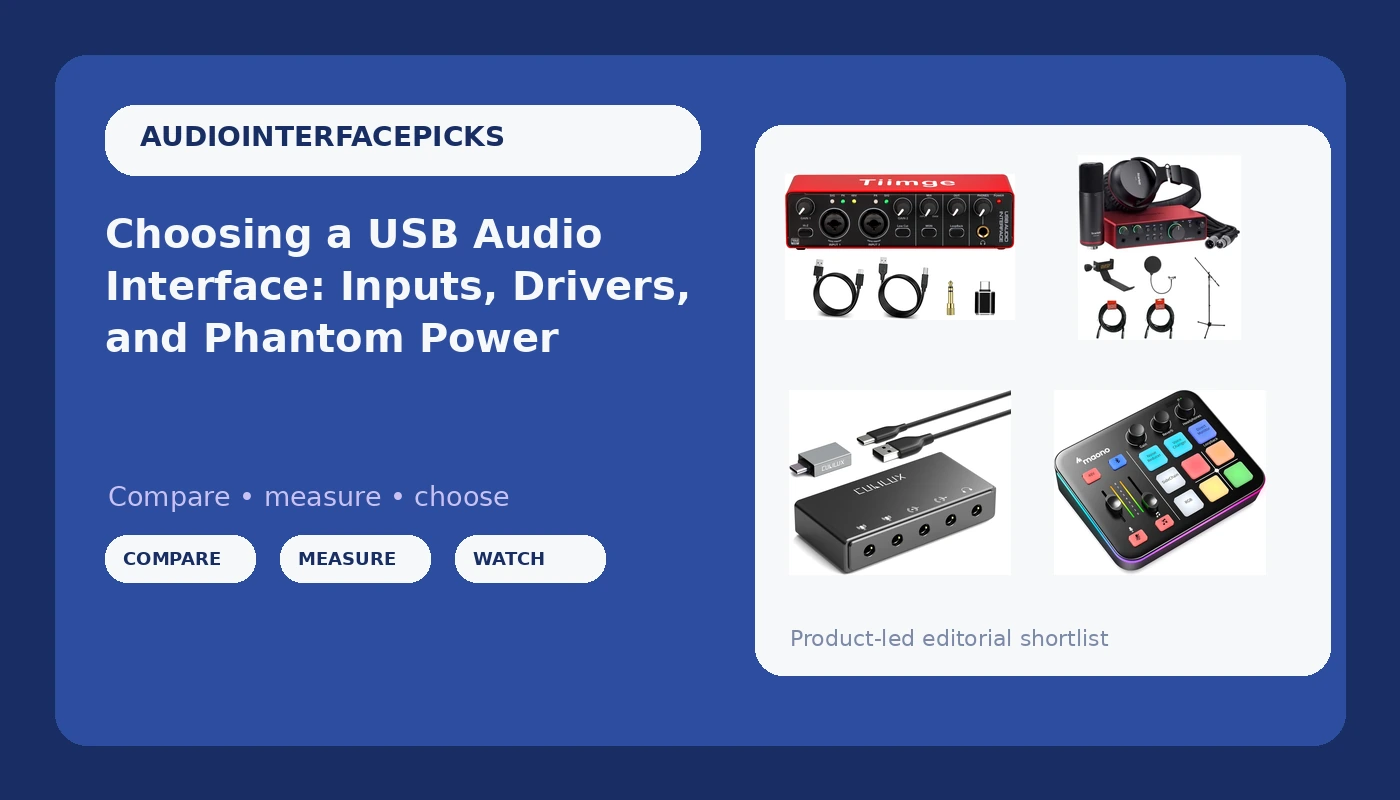
Most people shopping for their first USB audio interface for home recording start from the same place: a laptop, a microphone, and a rough idea of what they want to capture. The interface is the box in the middle. It turns an analog microphone or instrument signal into digital audio the computer can record, and it also decides how many sources you can plug in at once, whether a condenser microphone receives the 48 volts of phantom power it needs, and how much delay you hear between playing a note and hearing it back. Get those three things right and the rest is shopping detail.
The four options below cover different jobs rather than four versions of the same job. Two are conventional recording interfaces, one is a complete first-time bundle, one is a compact USB sound card for 3.5mm sources, and one is built as a small mixer for gaming and streaming. None of them replaces a good microphone or a quiet room, but any of them can sit at the center of a small setup that works.
Related: Gain Staging on a Budget Interface: Setting Levels That Survive a Mix →
Quick answer
Match the interface to the number and type of inputs you actually use. For one or two microphones recorded into a computer, a 2-in/2-out interface with XLR inputs, switchable 48V phantom power, and a headphone output covers the large majority of home sessions. If you are starting from nothing and need a microphone and headphones as well, a bundle removes the guesswork of matching parts. If your audio arrives through a 3.5mm connection, a compact USB sound card is the simpler fit. If you want physical controls within reach while you stream or play, a mixer-style interface is designed for that.
Four useful options
| Model | Best fit | What stands out |
|---|---|---|
| USB Audio Interface for PC, 2x2 Recording Interface with 48V Phantom Power, 24Bit/192kHz Studio Sound, XLR/TRS Inputs, Low Latency Monitoring for Guitar, Podcast, Music Production & Home Studio | Solo or duo recording into a computer | Two combo XLR/TRS inputs, 48V phantom power, 24-bit/192 kHz conversion, low latency monitoring |
| Focusrite Scarlett 2i2 Studio USB-C Audio Interface (4th Generation) with Condenser Microphone and Headphones Bundle with Tripod Mic Stand + Boom, Headphone Holder, Pop Filter & 2x XLR Cable | A first setup that needs everything at once | Interface plus condenser microphone, headphones, stand with boom, pop filter, and two XLR cables |
| Cubilux CB5 USB Audio Interface for Recording, Streaming, Podcasting, USB to 3.5mm Sound Card with Stereo Microphone Input, Line-In, Line-Out & Headphone Jack for Monitors, Support Windows & Mac OS | 3.5mm sources and compact desks | Stereo microphone input, line in, line out, headphone jack, Windows and Mac support |
| MAONO G1 Neo Gaming Audio Mixer Audio Interface with XLR Input & 48V | Streaming and gaming with hands-on control | Mixer-style design with an XLR input and 48V phantom power |
The two-input recording interface: USB Audio Interface for PC, 2x2 Recording Interface with 48V Phantom Power
A 2x2 interface is the shape most home sessions settle into. Two inputs means one microphone and one guitar, or two microphones for a conversation, or a stereo pair if the source deserves it. The combo jacks accept an XLR cable or a quarter-inch plug, so the same box handles a dynamic vocal mic and a keyboard without an adapter. The trade-off is fixed: there is no path to a third and fourth microphone later without buying a different interface, and no onboard mixing beyond setting the two input gains. For a podcaster or a solo songwriter, that ceiling is rarely reached. For someone recording a four-piece drum kit, it is reached in the first hour.
The complete bundle: Focusrite Scarlett 2i2 Studio USB-C Audio Interface (4th Generation)
The appeal of a bundle is that it removes decisions rather than adding features. A first-time buyer who orders an interface, then realizes the microphone needs a stand, then realizes the stand needs a boom to reach past a desk, then realizes the microphone cable was not included, has spent three weekends on logistics. Here the microphone, the headphones, the stand, the pop filter, and both XLR cables arrive together, and the pieces are already known to work with each other. The trade-off is that you accept the bundled microphone and headphones instead of choosing them, and a buyer who already owns a microphone is paying for gear they will not use.
The compact 3.5mm option: Cubilux CB5 USB Audio Interface
Not every recording starts with an XLR cable. A lavalier microphone, a camera feed, a mixer's output, a phone, or a gaming headset all arrive on a 3.5mm plug, and a full interface with combo jacks is the wrong tool for that signal. A compact sound card takes those sources over USB, routes them into the computer, and gives you a headphone jack for monitoring. It is also the smallest thing on this list to carry. The trade-off is that it does not provide the same input path as an XLR interface with phantom power, so a condenser microphone that needs 48 volts is not its job.
The mixer-style option: MAONO G1 Neo Gaming Audio Mixer Audio Interface with XLR Input & 48V
Streamers and gamers tend to want different things from an interface than recording engineers do. The priority is quick access to levels during a live session, not a pristine two-channel capture, and a mixer-style box puts that control on the desk. The XLR input with 48V means a proper condenser microphone is still on the table. The trade-off is that a device shaped around live control is not shaped around multitrack recording, so someone whose goal is tracking a band should look at the 2x2 option instead.
Prices and availability may change. Product images, names, and retailer links are matched to verified listings. No current price, rating, stock status, or measured result is stated here without current evidence.
What the specs on the box actually mean
The connector type is the first thing to check, because it determines what you can plug in. An XLR input takes a standard microphone cable. A TRS or quarter-inch input takes a guitar, a keyboard, or an outboard preamp. Combo jacks accept either. A 3.5mm input takes consumer gear: headsets, lavaliers, camera outputs, and phone feeds. An interface that has the wrong connector for your microphone is not a bargain at any price.
Phantom power is the second. Condenser microphones need 48 volts sent up the microphone cable to charge their capsule, and dynamic microphones do not. An interface with switchable 48V phantom power handles both, as long as you remember to turn it off for a ribbon microphone, which can be damaged by it. The listing for the 2x2 interface and the MAONO mixer both specify 48V, and that is the feature that separates them from a plain sound card.
Conversion specs are the third, and they matter less than the marketing suggests. A 24-bit/192 kHz rating describes the maximum resolution the converter can run at. Almost all release recordings happen at 24-bit/44.1 kHz or 24-bit/48 kHz, because those rates are what streaming and video platforms expect, and a higher sample rate mainly buys you larger files. A 24-bit/192 kHz ceiling is a sign of a current converter, not a guarantee about how the preamp sounds at three o'clock on the gain knob.
Latency is the fourth, and it lives in the driver rather than on the spec sheet. Round-trip latency is the total delay from a signal entering the interface to hearing it back through the headphones with plugins in the path. Direct or low latency monitoring sidesteps the computer entirely by sending the input straight to the headphone output, which is why it is worth having even on a budget box. Under about 10 milliseconds feels immediate to most players. Above that, timing starts to feel like playing through a delay pedal you did not ask for.
The headphone output is the spec nobody reads until it becomes the problem. A headphone jack has to drive whatever impedance the headphones present, and high-impedance studio headphones ask more of it than earbuds do. If the output runs out of headroom, the symptom is a quiet, thin, or crackly monitor mix, not a clean failure.
How to narrow it down
Start from the session, not the product page. A solo vocalist, a two-person podcast, and a streamer all need different things from the same category of box, and the list above reflects that.
- Count the sources you record at the same time, and add one for future use. That number is your input count.
- List the connectors your microphones and instruments use. XLR, quarter-inch, and 3.5mm all point to different products.
- Note whether any of your microphones are condensers, because that determines whether you need switchable 48V phantom power.
- Decide whether you need monitoring that bypasses the computer. Direct monitoring is the feature that keeps timing usable during tracking.
- Check that the parts you are buying actually connect to each other, especially stands, cables, and headphone plugs, before ordering.
Setup habits that prevent most interface problems
- Set input gain so the loudest part of a performance peaks well below clipping, then leave headroom for a surprise.
- Disable phantom power when a ribbon or dynamic microphone is connected, and enable it only for condensers that require it.
- Use the interface's own headphone output for monitoring instead of the laptop's, so you hear what is actually being recorded.
- Keep the interface on a dedicated USB port rather than a shared hub, which is where dropouts usually come from.
- Set the sample rate in your recording software to match the interface, and set it before you start, not after a take.
Which option should you choose?
Choose the USB Audio Interface for PC, 2x2 Recording Interface with 48V Phantom Power, 24Bit/192kHz Studio Sound, XLR/TRS Inputs, Low Latency Monitoring for Guitar, Podcast, Music Production & Home Studio when you record one or two sources into a computer and already own the microphone and headphones. Choose the Focusrite Scarlett 2i2 Studio USB-C Audio Interface (4th Generation) with Condenser Microphone and Headphones Bundle with Tripod Mic Stand + Boom, Headphone Holder, Pop Filter & 2x XLR Cable when you are building a first setup from scratch and would rather buy the microphone, headphones, stand, and cables in one decision. Choose the Cubilux CB5 USB Audio Interface for Recording, Streaming, Podcasting, USB to 3.5mm Sound Card with Stereo Microphone Input, Line-In, Line-Out & Headphone Jack for Monitors, Support Windows & Mac OS when your audio arrives on a 3.5mm plug and you want the smallest box that routes it. Choose the MAONO G1 Neo Gaming Audio Mixer Audio Interface with XLR Input & 48V when you stream or game and want levels under your hand during a live session.
The evidence caveat is straightforward. The features listed here come from the product listings, not from bench measurements, and no interface in this group has been described in terms of preamp character, driver stability, or measured round-trip latency. Those are the things that decide whether a box survives a real session, and they are the things you can only judge by reading the current listing, checking the return policy, and running your own first recording.
The bottom line
Input count and connector type decide more of your experience than any other spec on the box. Buy the interface that matches the microphones and instruments you own today, make sure it provides phantom power if you use condensers, and insist on direct monitoring so your timing stays intact while tracking. A bundle makes sense when you own nothing yet; a 2x2 box makes sense when you own the microphone already; a compact sound card makes sense when the signal is 3.5mm; and a mixer-style interface makes sense when the session is live. Everything past that is preference, and preference is the part you get to change later.