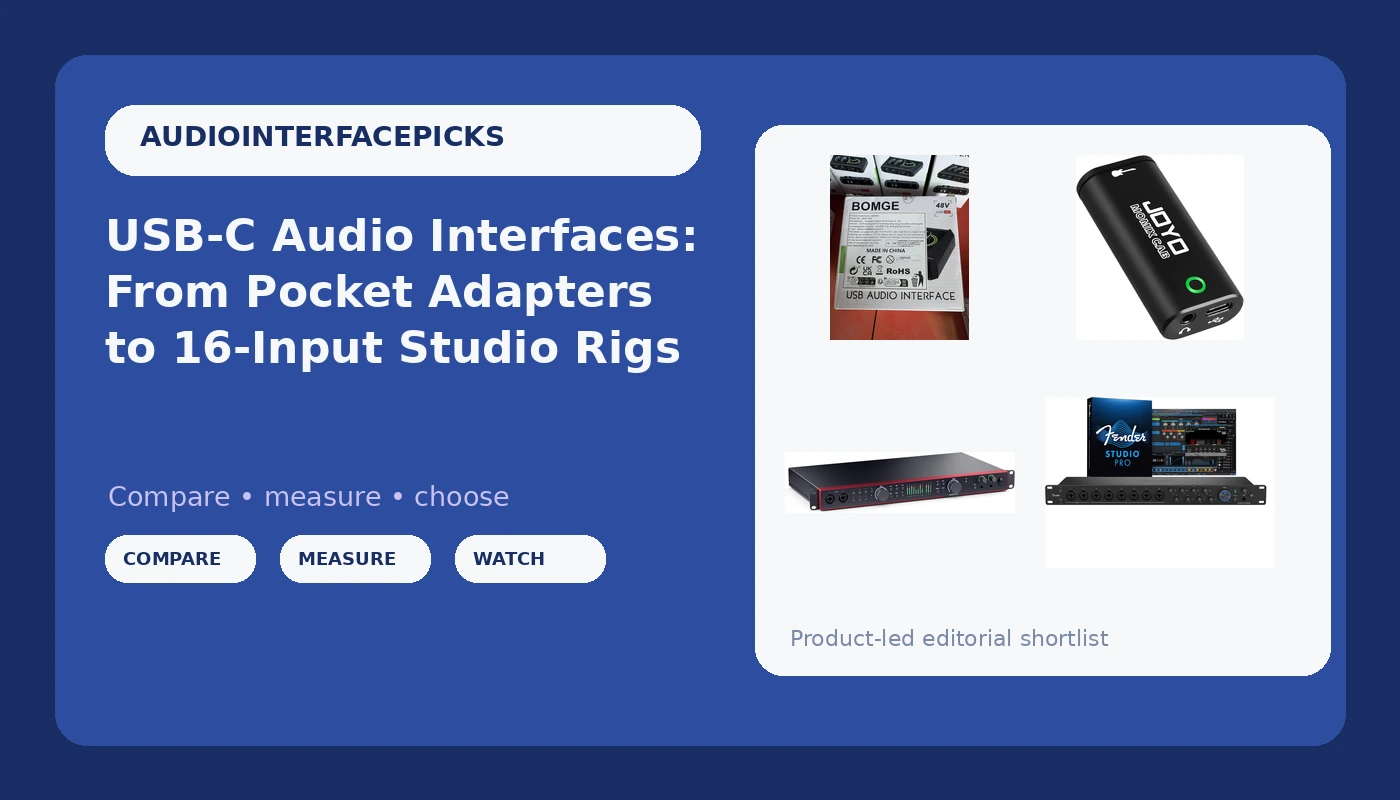
Buying a USB-C audio interface in 2026 means looking at two ends of the market at the same time. One end is a pocket adapter that turns a guitar and a phone into a recording rig. The other is a rack-width box with sixteen inputs, eight microphone preamps, and drivers built for people tracking live drums. Both are USB-C audio interfaces, and both can be the correct purchase, which is exactly why the spec sheet alone rarely settles anything.
The trouble is that interface marketing describes capability, not fit. Sixteen inputs is not better than two inputs, it is bigger. What actually decides whether a USB-C audio interface earns its place on your desk is a short list of practical questions: how many microphones you need live at once, whether any of them require 48V phantom power, whether you monitor on headphones or speakers, and whether your computer and its drivers can keep up with what you are asking them to do. The four options below sit at genuinely different points on that scale, and the sections after them explain how to choose between them without overbuying.
Related: Best Audio Interfaces Under $300 for Home Studios →
Quick answer
Match the interface to the session, not to the price tag. If you record one guitar or one vocal at a time on a laptop or a phone, a single-input or two-channel unit is enough. If you record a singer and a guitarist together, or you use a condenser microphone, you need at least one XLR input with 48V phantom power. If you track drums, a full band, or several microphones at once, the decision moves to the higher channel-count units, where preamp count, line inputs, monitoring options, and driver behavior matter far more than the size of the type on the box.
Four useful options
| Model | Best fit | What stands out |
|---|---|---|
| Fender Quantum LT 16 | Full-band tracking and multi-mic sessions | 16 inputs and 8 outputs, eight MAX-HD mic preamps, 14 line inputs, loopback, balanced outputs |
| Focusrite Scarlett 18i20 4th Gen USB-C Audio Interface | Studios that expect to grow | An 18-in / 20-out format, USB-C connection, 4th Gen Scarlett line |
| BOMGE mini 2 Channel USB Audio Interface | A first interface for a vocalist, guitarist, or podcaster | Two channels, XLR input with 48V phantom power, USB connection |
| JOYO Guitar Audio Interface (MOMIX CAB) | Guitar into a phone, anywhere | 6.35mm instrument input, 3.5mm headphone output, USB-C and Lightning, direct monitoring |
The full-band rig: Fender Quantum LT 16
The trade-off here runs in two directions. If you record one vocal at a time, most of those preamps sit idle, and you paid for channels you never use. If you do track a band, the interface becomes the cheap part of the purchase, because eight microphones, stands, and cables cost more than the box they plug into. One practical note for any unit with this many preamps: phantom power across eight channels is a serious current draw, so confirm on the listing whether the unit runs from bus power or its own supply before you plan a session around it.
The expandable center: Focusrite Scarlett 18i20 4th Gen USB-C Audio Interface
A channel count like this is a promise about the future more than a fix for today. If your current sessions are a guitar and a vocal, the extra inputs will not improve them, and the extra routing options will simply take longer to learn. Where this class of interface earns its keep is when your patch bay, your monitor setup, and your microphone locker all grow at once. The honest ceiling on a unit like this is not the channel count, it is the driver stability and the speed of the computer feeding it, so treat your machine as part of the purchase.
The two-channel start: BOMGE mini 2 Channel USB Audio Interface
The listing uses the phrase studio quality, and it is worth keeping that in perspective. An interface is one link in a chain that also includes the microphone, the room, and how you set your levels, and the room usually matters more than the converter. What you should actually evaluate at this level is behavior rather than adjectives: whether the preamp stays clean as you push the gain up, whether the drivers remember your settings after a reboot, and whether phantom power holds steady on a busy USB port. The limitation is expansion. Two channels is two channels, and the day you need four microphones, you buy again.
The pocket adapter: JOYO Guitar Audio Interface (MOMIX CAB)
The trade-off is deliberate and narrow. There is no XLR input and no phantom power here, so a condenser microphone is out of the question and vocals need a different path. What it does well is remove friction: an instrument cable in, headphones out, and a riff is captured before the idea disappears. That makes it a useful second device rather than a replacement for a proper interface, and it is the kind of thing that lives in a gig bag instead of on a desk.
Prices and availability may change. Product images, names, and retailer links are matched to verified listings. No current price, rating, stock status, or measured result is stated here without current evidence.
What the input numbers actually mean
An input count on a spec sheet hides three different kinds of connection. A microphone preamp accepts a low-level balanced signal and applies gain, and that gain stage is where cheap interfaces separate from good ones. A line input expects an already amplified signal from a keyboard, a mixer, or an outboard preamp, and it bypasses the mic gain stage. An instrument input, often labeled Hi-Z or DI, accepts a guitar or bass directly and presents the impedance the pickups want to see. The Fender Quantum LT 16 lists eight mic preamps alongside fourteen line inputs, which is a very different thing from sixteen microphone channels.
Phantom power is the second thing to read carefully. Condenser microphones need 48V, dynamics and ribbons generally do not, and ribbon microphones in particular should not be fed phantom power unless the manufacturer says otherwise. An interface with 48V on one or two channels is fine for a home studio. An interface with 48V on eight channels at once is drawing real current, and that is where bus power can become a gamble on a laptop with a busy port.
The third spec nobody reads until it annoys them is the headphone output. A headphone amp that cannot drive high-impedance headphones quietly enough will clip, and a jack that crackles at low volume is a daily irritation. If you monitor on speakers instead, balanced outputs on the back of the interface are what keep hum and noise out of the line run.
Then there is latency, which is a driver story rather than a converter story. Round-trip latency is the full trip in and out of the interface with your plugins loaded, and it is the number that decides whether you can track a performance comfortably. Loopback routing, listed on the Quantum LT 16, is a separate feature that sends the computer's playback back into a recording channel, which is how most streaming and podcast setups handle audio for a guest or a broadcast.
How to match an interface to the way you record
- Count the sources you need to record at the same time, not the number of tracks in your finished song. Overdubbing means one input can build a whole arrangement.
- Decide whether any of those sources is a condenser microphone. If yes, phantom power is a requirement and it narrows the field immediately.
- Check the outputs against your monitoring. Headphone-only sessions and sessions with a pair of studio monitors have different needs.
- Confirm the connection and driver support for your specific computer, including whether the unit can be powered reliably from your USB port.
- Verify the current details on the product listing before you buy, since feature sets, bundles, and bundled software change between production runs.
Practical guidance
- Set gain so the loudest moment of a take peaks well below clipping, then listen rather than trusting the meter alone.
- Budget for the microphone and headphones at the same time as the interface, because the interface is only one link in the chain.
- Test round-trip latency with a real session, plugins included, while the return window is still open.
- Plug the interface into a port that is not sharing bandwidth with bus-powered drives, especially when phantom power is on.
- Write down your gain and routing settings after a session that worked, so the next one starts from a known good place.
Which option should you choose?
Choose the Fender Quantum LT 16 when you record several microphones at once and want the preamps and line inputs to stay patched between sessions. Choose the Focusrite Scarlett 18i20 4th Gen USB-C Audio Interface when you are building a studio that will keep growing and want a high channel count with a USB-C connection. Choose the BOMGE mini 2 Channel USB Audio Interface when you record one or two sources at a time, need phantom power for a condenser, and want to keep the entry cost low. Choose the JOYO Guitar Audio Interface (MOMIX CAB) when the instrument is the whole session and the phone in your pocket is the recorder.
Nothing here was measured in a studio for this article, and no round-trip latency figure, preamp performance claim, or durability claim is being made about any of these units. Verify channel counts, power requirements, and included software on the current listing before you commit.
The bottom line
The right USB-C audio interface is the smallest one that covers the sessions you actually run. If that is a guitar into a phone, the pocket adapter does the job. If it is a vocalist with a condenser microphone, two channels with 48V is the floor. If it is a drum kit or a full band, the higher channel counts exist for a reason, and that reason is simultaneous sources rather than prestige. Start from your input list, confirm phantom power and monitoring, and let the rest of the spec sheet stay in the background until your sessions demand more.